From the CIO

Thanks to the influence of Google and Facebook, open office environments have become the new norm in the tech world. But do they help or hinder productivity? Multiple studies suggest that Google and Facebook may have led us astray.
The Wall Street Journal takes a closer look at the Delta power outage that cancelled 451 flights and asks if today’s carriers are too reliant on systems dating back to the 1990s.
Millennials are the most stressed out demographic in the workforce. The cure, according to CIO.com: Flexible schedules and working remotely.

Technology News 

In today’s BYOD environment, amassing an enormous collection of expensive cables and adapters (HDMI, VGA, HDMI to VGA, DVI to HDMI, Thunderbolt, Thunderbolt to HDMI, Lightning to HDMI, etc) is the only viable alternative to having a wireless conference room. It’s not much of an alternative, writes David Humphreys.
Patrick Gray of TechRepublic goes over six cybersecurity and emergency situations every IT department needs to prepare for.
Apple has patented its first vehicle, and it’s probably not what you were expecting. Brace yourself for the iTank.


Want to set up a wireless Conference Room?Try Now

One morning in May of 1905, an obscure Swiss patent clerk came downstairs in his dressing-gown, took a seat at the breakfast table, and announced to his wife, “Darling, I have a wonderful idea.” After drinking his coffee, he walked over to the piano and started playing a few notes. Every now and then, he would pause and exclaim, “I’ve got a wonderful idea, a marvelous idea!” 

Pressed by his wife to elaborate, the man simply said, “It’s difficult, I still have to work it out.” He then locked himself in his study and remained there for the next two weeks. “Each day I sent him up his meals,” his wife would later recount to the silent film star Charlie Chaplin. “And in the evening he would walk for a little exercise, then return to his work again.”

Eventually, the man emerged from his study looking extremely pale. He put a few sheets of paper down on the kitchen table and said, “That’s it.” Contained within those sheets of paper was the single greatest contribution to science since 1666, the year that Isaac Newton fled to his mother’s house in rural Woolsthorpe—the plague was difficult to avoid that year—and developed calculus, an analysis of the light spectrum, and the laws of gravity. (Famously, Newton didn’t bother to tell anyone about his findings until several years later).

What these two discoveries have in common is that they were both done in almost complete isolation. Neither scientist had to deal with the hassle of sitting at a communal table full of chatty colleagues who insist on playing ping pong every half hour, can’t stop laughing at the latest funny cat video, and drone on endlessly about how the HBO series Game of Thrones is really starting to diverge from the George R.R. Martin books.

All of this stands in stark contrast to the prevailing wisdom, which states that the best way to come up an innovative idea is to cram as many people as possible around a giant table inside of a giant building that has just enough walls to prevent it from collapsing. The philosophy behind this is that the open space will encourage “creative collisions,” a popular buzz phrase which is basically interchangeable with “conversations.” Employees who talk to each other, the thinking goes, are in a better position to pool their knowledge, and are therefore in a better to position to apply that knowledge to whatever problem is at hand.

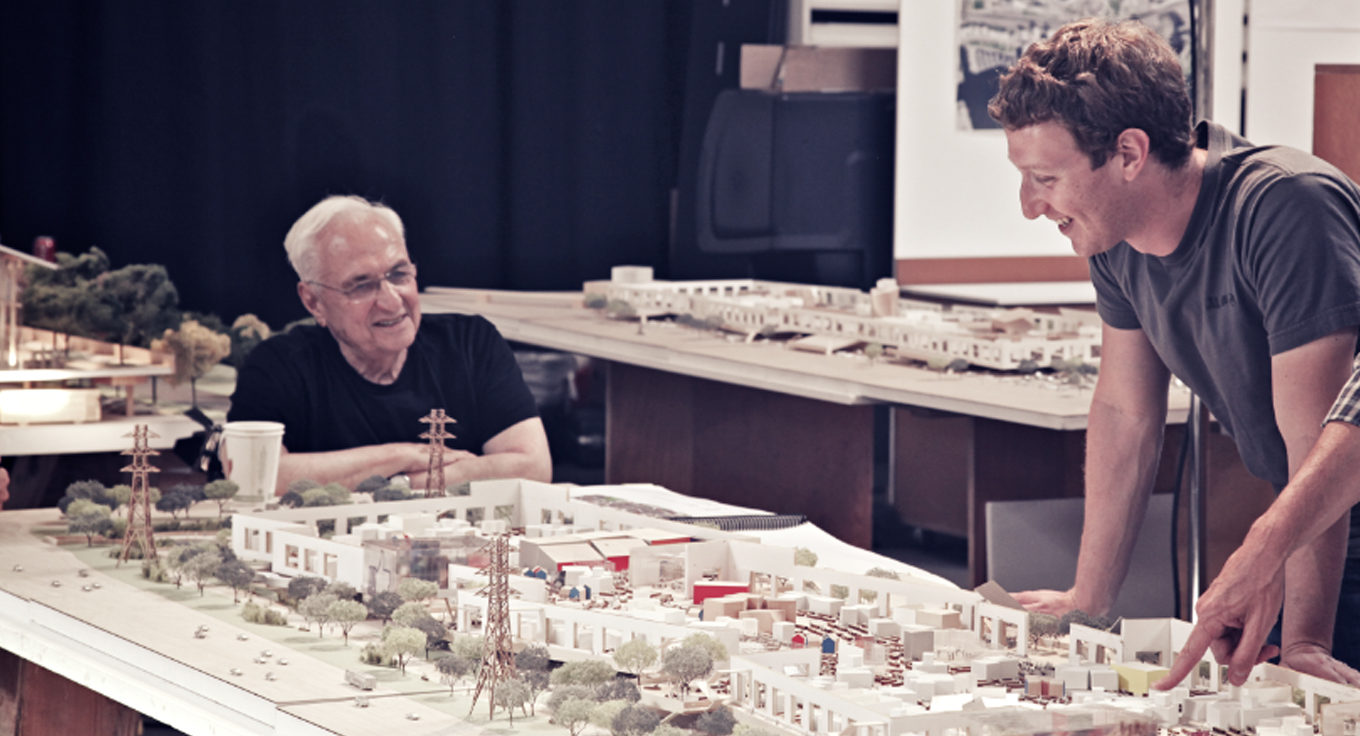
This style of office layout was first introduced by a team from Hamburg, Germany, in the 1950s, then it migrated across the Atlantic, where it was enthusiastically embraced by Google, Yahoo, eBay, Goldman Sachs, and American Express. Facebook became the ultimate practitioner of the concept when Mark Zuckerberg hired Frank Gehry to design an open floor plan that could house 3,000 engineers, the largest office space of its kind in the world.
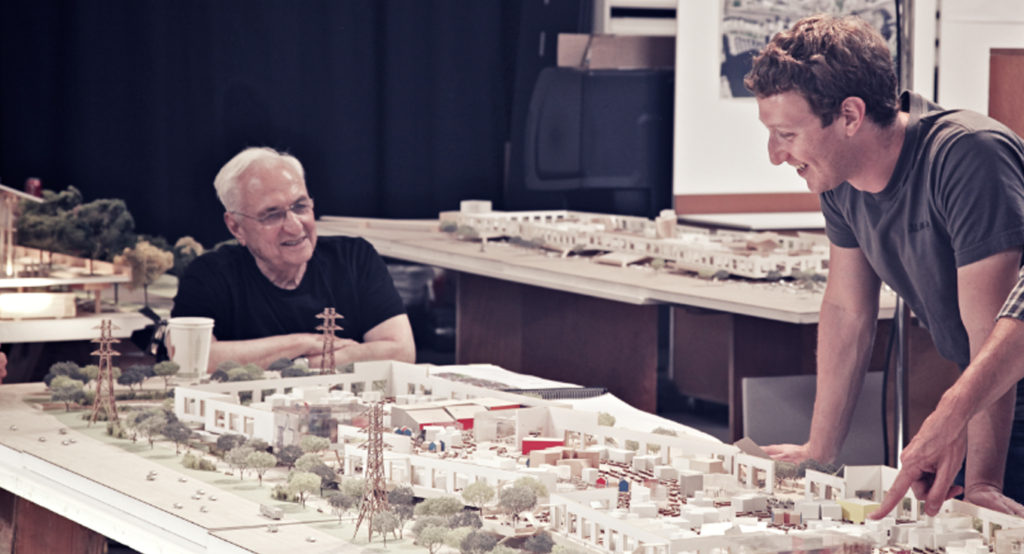
Mark Zuckerberg and Frank Gehry review architectural models of Facebook's collaborative space.

 After taking over the corporate world (or at least 70% of the corporate world, according to one estimate), the Hamburg model is now poised to take over college campuses as well. A recent New York Times article notes that just about every college campus on the continent has a Gehry-esque Facebook-type building in development.

While this style of office layout has been shown to save on furniture costs, it has not been shown to improve productivity. After reviewing more than a hundred studies about office environments, organizational psychologist Matthew Davis found that open offices had a negative impact on workers’ attention spans, productivity, creative thinking, and satisfaction. Likewise, a survey of 38,000 workers conducted by David Craig found that the open environment led to decreased productivity, particularly among more senior employees. Nearly half of the workers surveyed in a 2013 study, meanwhile, complained that noise issues stemming from the open environment were hampering their ability to get work done.

Of course, none of this is to say that collaboration itself is unproductive. Indeed, Einstein credits a conversation he had with Michele Besso, one of his colleagues at the patent office, with helping him unravel one of the most difficult problems of relativity. The key to take away from this, however, is that the conversation happened on the street while the two men were walking to work, not at a communal desk 20 feet away from a ping pong table. In this particular case, having conversations in a place where conversations are supposed to happen and doing work in a place where work is supposed to be done seems to have worked out pretty well.

Some will argue that the open office environment can produce results that are simply impossible to produce in a partitioned space, and this is certainly true. For brain-storming sessions, team-building exercises, and maintaining a general sense of mission, the open office environment can’t be beat. But for tasks which require intense concentration and imagination, surrounding yourself with potential distractions may not be the best way to go.

Additional Reading
Will an Open Office Work Environment Help Your Employees Succeed
Is an Open Office Environment Beneficial or Detrimental to Your Team?
Office Rules Apply: Dealing With an Open Office Environment


From the CIO

Kim Stevenson of Intel discusses how her experience as CIO prepared her for her new role as COO.

The Harvard Business Review argues that the tech world could stand to learn a thing or two from the Amish (about team-building and collaboration, not about technology, because that would be absurd).

Minimally partitioned buildings designed to encourage “creative collisions” have been the standard in Silicon Valley for awhile now, and soon they’ll be the standard on campuses too. Alexandra Lange of the New York Times examines the emerging trend.

Technology News 

Andy Patrizio of CIO.com dismantles the myth that old people are baffled and bewildered by new technology. According to the results of a new survey, IT professionals over the age of 55 find adapting to new technology less stressful than their millennial counterparts.

Google’s new search engine algorithm is a closely guarded secret, but experts say that content relevance and inbound links are still the most important factors.

The push for data localization in the wake of the Snowden leaks has been remarkably ineffective in Western Europe, where four American firms have a 40% market share in cloud services, the Wall Street Journal reports.


Want to set up a wireless Conference Room?Try Now

ebb9fe70-6e5d-405d-b6cd-de2ce72b4359

From the CIO

Gary Steen, CIO of TalkTalk, discusses the procedures his team implemented following a cyber attack that exposed the personal information of hundreds of thousands of customers.
Jan Willem-Brands of Barco extolls the virtues of the wireless conference room. “Meeting room technology needs to be upgraded and brought into the BYOD era,” he writes.
Want to increase productivity without spending money? R.L. Adams of Forbes argues that exercising self-restraint when it comes to browsing social media and playing mobile games is a much better strategy than purchasing a faster computer or tablet.

Technology News 

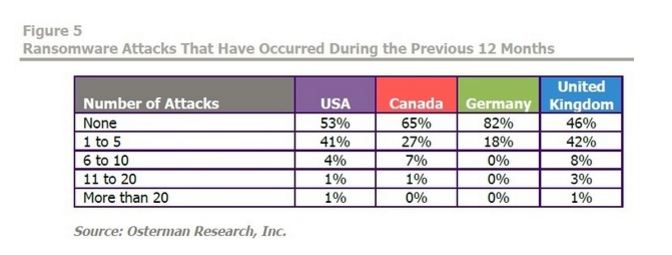
Is your business based in the United States? If so, there’s a 50% chance that you’ve been the victim of ransomware, a new study indicates.
Screen Shot 2016-08-03 at 6.18.51 PM
According to the New York Times, China is no longer following in Silicon Valley’s footsteps when it comes to mobile technology, but rather—thanks to apps like WeChat and Alipay—leading the charge .
Has your conference room devolved into an epicentre of boredom, frustration, and dread? Don’t worry: UBIQ has 5 quick tips to help you turn the situation around.

Want to set up a wireless Conference Room?Try Now

Within the first few seconds of being introduced to someone new, a person reaches at least 9 conclusions. That means that before you even open your mouth to speak, some audience members may have decided if your presentation was worth listening to or not. With so many judgments being made at the start of any meeting, the pressure to make a good first impression is critical.
For CIOs and other IT leaders, giving presentations can sometimes be one of the hardest parts of the job. However, as the role continues to transform, the need for top-notch presentation skills is becoming more and more important. Below are five ways to make a lasting first impression on your next pitch.

Prepare Beforehand

One of the most basic but influential factors in giving a winning presentation is the part that happens before you enter the room: preparation. Preparing for your presentation ahead of time is especially necessary for those that are uncomfortable with public speaking or when speakers are talking about more complex topics.
If possible, assess the meeting space beforehand. Do a walkthrough of the area and test out the video and other equipment to make sure that it is ready. Problems with technology are one of the major hurdles that speakers often face. One solution to technology set-up time is to use a wireless presentation system that requires no wires or cable installation.

Dress the Part

Dressing appropriately for a presentation may seem like an easy part to remember. However, it is sometimes the most overlooked. In any setting, appearance is a huge factor that influences first impressions.
How you dress depends largely on who you are presenting to. For instance, presenting to board members, new clients, or conference attendees may call for business casual clothing. On the other hand, at some startup tech companies, dress shirts and jeans may be perfectly acceptable. For most cases, however, professional dress is usually the standard attire.
bow-tie-businessman-fashion-man

Start With a Bang

In a recent Harris survey, 17 percent of employees said that they would rather watch paint dry than sit in another meeting.
In order to overcome your audience’s anti-meeting bias, you need to make them want to listen. A simple way to get audience members excited is to show that you are excited about presenting by bringing energy and confidence into the meeting. Secondly, grab their attention right from the start. This can be done in a number of ways and doesn’t always require the “bells and whistles” one may think they need to grab attention. Catering the information specifically to them can help.
tumblr_nqx8ivY3et1tubinno1_1280

Organize With Data and Visuals

IT leaders may frequently have to speak on complex topics. When giving a presentation on subjects that require advanced degrees to understand, it is important to pair the data and statistics with easy-to-understand visuals. Starting out with an agenda or outline of the presentation can also give audience members the impression that you are well organized.
However, it is important not to focus solely on data. Data is a necessary component of presentations, but it should be coupled with a compelling story or meaningful insight that promotes action.

Involve Your Audience

Some pitches fail because presenters were speaking at their audience and not with them. The two concepts may sound the same, but they are very different. If you are proposing a new IT solution it is important to first understand what types of problems or goals the company or audience you’re pitching to experiences on a regular basis. Then, you can personalize your pitch examples specifically to them. Using collaboration tools can also make meetings more interactive and gives attendees a method to provide feedback in real-time.
Making a great first impression is tough, especially when the subject of your presentation relates to advanced technology. Speakers need to be conscious of how they start off a pitch, because the first impression can influence the entire presentation.
Additional Reading
Top 10 Conference Room Projectors of 2017
Wireless Screen Sharing Vs. Conference Table Cable Management
5 Must-Have AV Products For Your Conference Room

Want to set up a wireless Conference Room?Try Now

Ah, the conference room. What should be one of the most productive areas of your office often turns into an epicenter of boredom, frustration, and dread. “Ugh, another meeting? How long is this one gonna take?” Easy fix, all we have to do is throw a lot of high tech TVs and gadgets in there, right?
Wrong.
What a lot of companies tend to overlook is in fact the most important factor to consider when elevating your conference room to the next level: the people inside it. Although you may just see your conference room as a place where meetings occur, they can serve as the catalysts for office bonding or for the next big idea. If you’re looking to break the monotony of your business, check out these five tips on what it takes to make your conference room the productivity hub of the whole floor.
1. Your Colleagues
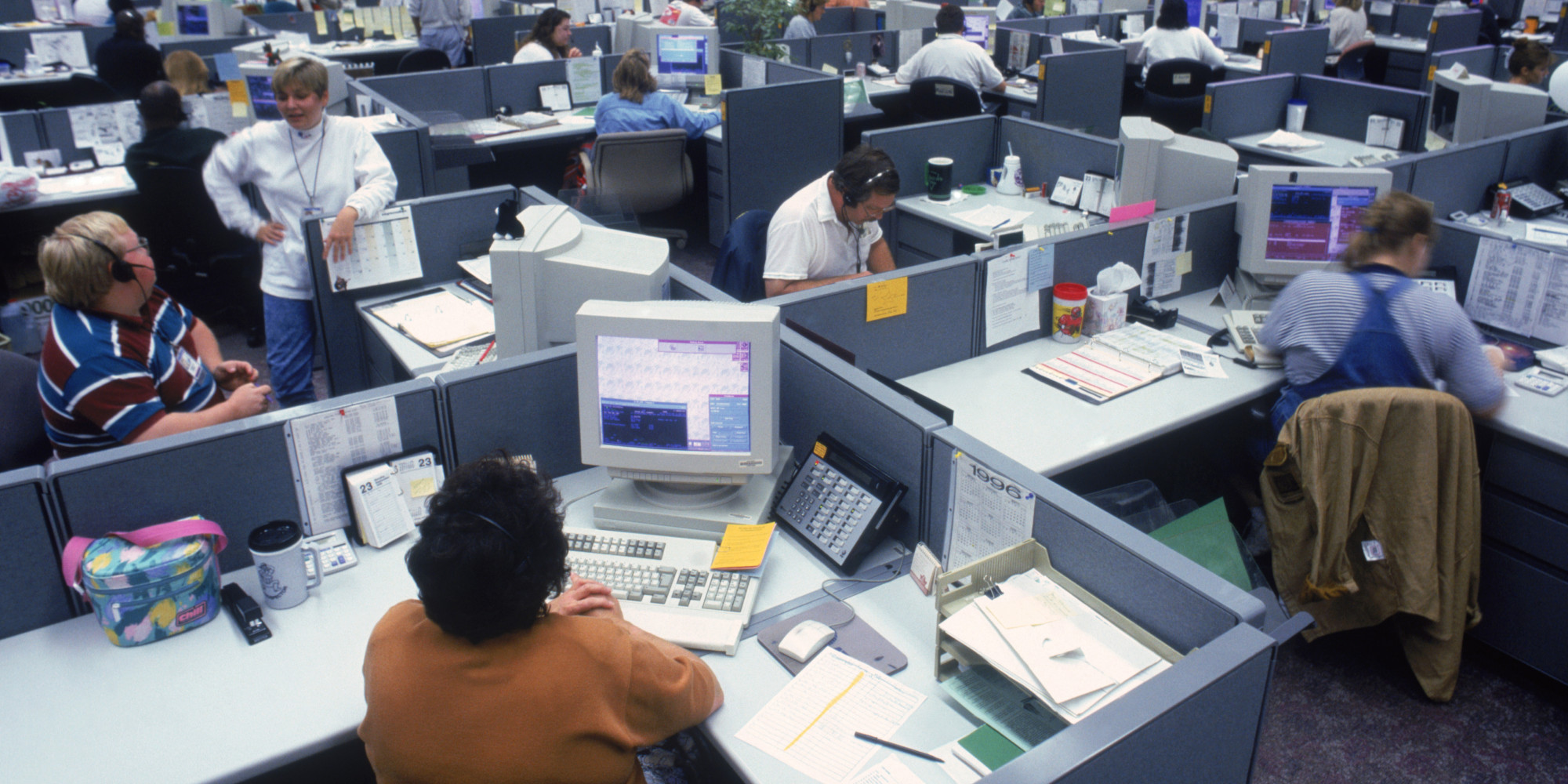
o-OFFICE-CUBICLES-facebook

via Huffington Post

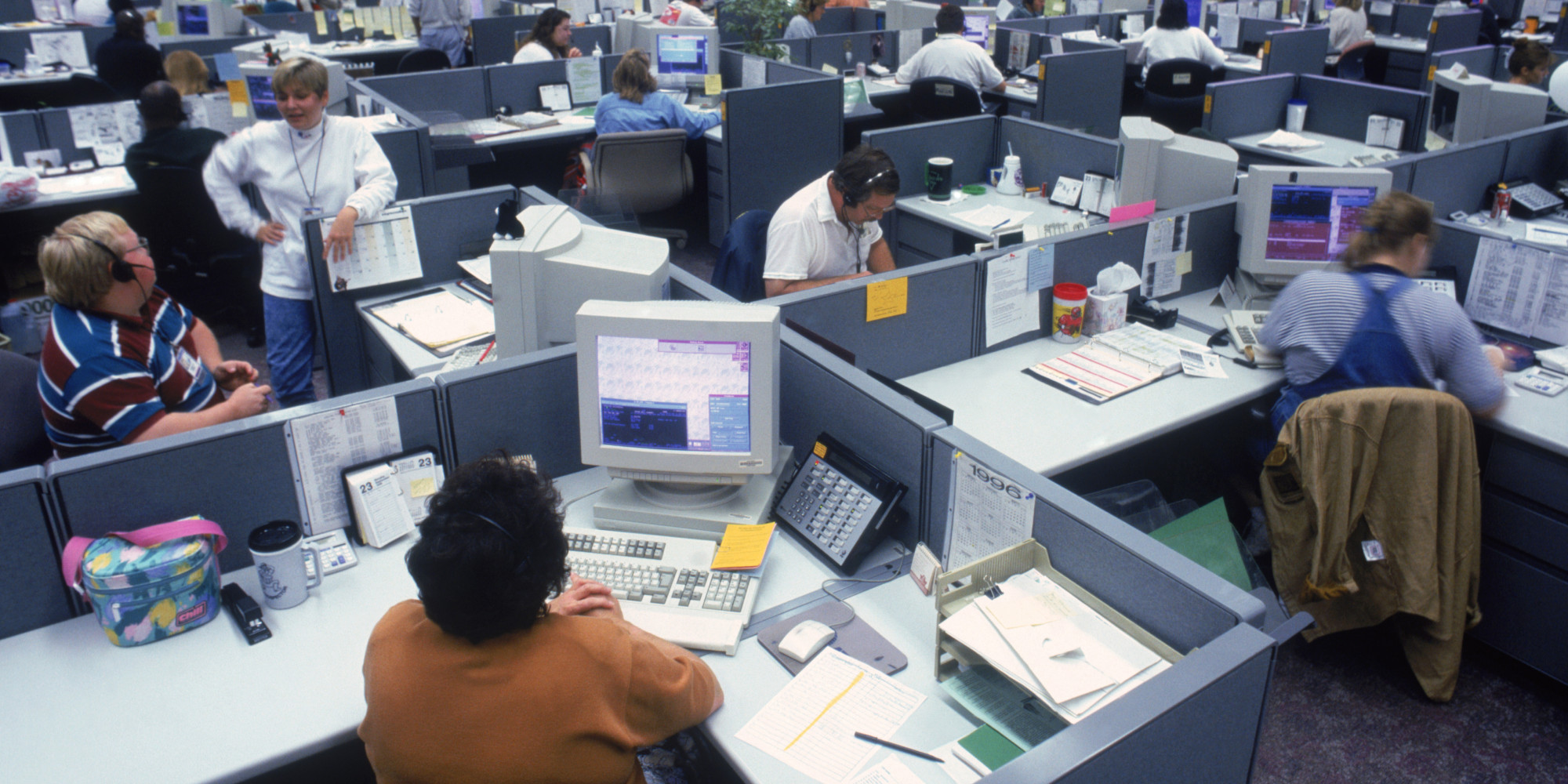
Sometimes it’s easy to get the above image in your head when you picture your colleagues, but it’s important to realize that they’re not just workers jammed into cubicles. Each person has their own way of completing projects, writing reports, and communicating around the office, which is why it’s in your best interest to find out what makes them hum. If you find that they’re loving the free coffee, but hating the way memos are sent out, start making some changes. You’ll see it reflected in the conference room in no time.
power rangers

via Foe

2. Bring Your Own Device
Company-wide computer setups can certainly be useful, but their success doesn’t always transfer over to the conference room. Supporting a Bring Your Own Device program in the workplace establishes a sense of comfort and familiarity that many of the not-so-tech-savvy will embrace with open arms. Plus, the new association between their favourite device and work might just encourage productivity out of the office as well. Everybody wins!
rs_500x235-140102133540-tumblr_inline_mxdzh0ekMK1rg0g8s

via EOnline

3. Help Desk Support
Now that you’ve got your coworkers embracing technology a little bit more, here comes the inevitable onset of crashed computers. Fear not! Taking the time to optimize your IT department will go a long way towards increasing productivity, starting with an IT ticketing system. By prioritizing high risk situations and opening communication between employees, you can expect to see a higher level of transparency in the workplace through efficient problem solving.
giphy

via Giphy.com

4. Functional Space
635934313858707314239385828_the-office2

via Bustle

I’m not talking about the “feng shui” of your conference room here, but rather how the employees of your company need the space to behave. Are people getting frustrated with a constant loss of Wi-Fi when they’re in there? Look into updating your network. Do meetings routinely start ten minutes late because of tangled wires? Try embracing wireless presentation technologies. No matter what changes you make, allow your employees to have a say, and watch the productivity soar.
 
5. Training
Fitness-Computer-Workout

via Magnifazine

This isn’t exactly what I had in mind, but investing your team in training will serve multiple goals. Now that you’ve discovered what technologies need to be implemented into the conference room, it’s up to you to provide clear and effective documentation so you can be as productive as possible. Additionally, your IT team will be needing to know what they’ll be dealing with, and training them prior to introducing the new tech will only optimize your conference room environment.
The final verdict? While you may find that investing in new and different technologies may ultimately benefit the workplace, improvement needs to begin with the people who will be using them. Keep an ear to the ground to discover what works and what doesn’t for your office, and look for ways to make the conference room a stimulating environment for everyone on your team. Be careful though; after following these tips, they may never want to leave!

Want to set up a wireless Conference Room?Try Now

622752fd-3751-4622-8cfa-6c56c90fa5ad
From the CIO
Oliver Bussmann of UBS and Level39 argues that the days of lone geniuses locking themselves away in rooms and inventing game-changing technology single-handedly are over. The future of innovation will be collaborative.
Liv Fiksdahl, CIO of Norway’s largest bank, discusses how outsourcing the equivalent of 500 full-time IT positions to India helped her reduce costs by nearly 60%.
Marty Miner, CIO of Leidos, reflects on the lessons he learned after inheriting an IT organization that was on the brink of disaster. “No one division in IT was responsible for ensuring IT operations and business continuity, and all the divisions were doing some type of development,” he recalls.

Technology News

Why do the children featured in this viral video assume that print magazines are broken iPads? Jonathan Margolis of the Financial Times discusses how technology is changing the way our brains are wired.
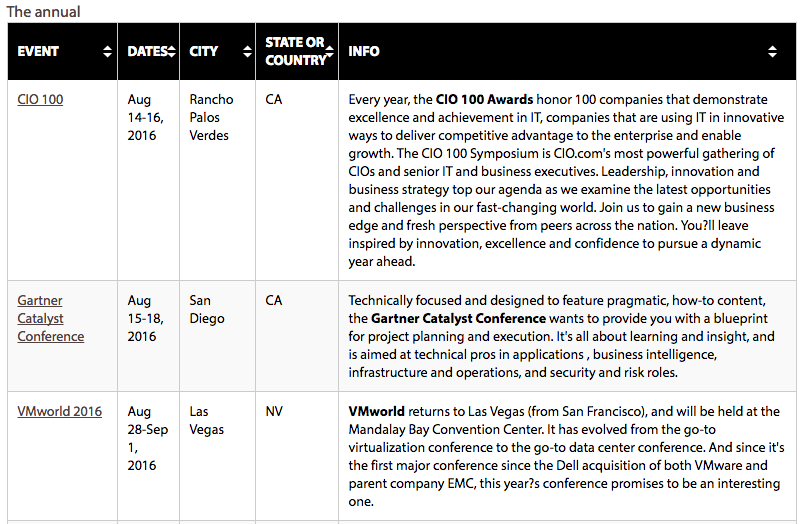
If you’re looking to stay up-to-date with emerging trends, expand your network, and redeem some of your soon-to-expire AirMiles (just five months until all of your pre-2012 miles vanish into thin air), CIO.com has you covered. They’ve compiled a sortable list of the fall’s most important upcoming tech conferences, not all of which will take place in Vegas.
Jacqueline Chan released a new blog article on ‘3 wireless technologies that can give your IT superpowers.’
Screen Shot 2016-08-02 at 6.44.48 PM

Want to set up a wireless Conference Room?Try Now

Let me guess: When you go home at night after a long day of work, you like to relax and kick back with your laptop or tablet, maybe catch a movie or show on-demand, and then read an e-book before you turn in. In addition to what sounds like a relaxing evening, you made it through the whole night with a notable absence: cords. You’ve been going wireless in your own home for years now, and the more you think about it, the more you realize that your business should be doing the same.

“But we already have laptops!” That may be true, but I can guarantee that you haven’t been utilizing wireless office technologies to their full potential. Here are three quick fixes that will spark an increase in productivity around the workplace:

1. Cloud Computing

ST-Cloud-LoL

Photo via GuidingTech

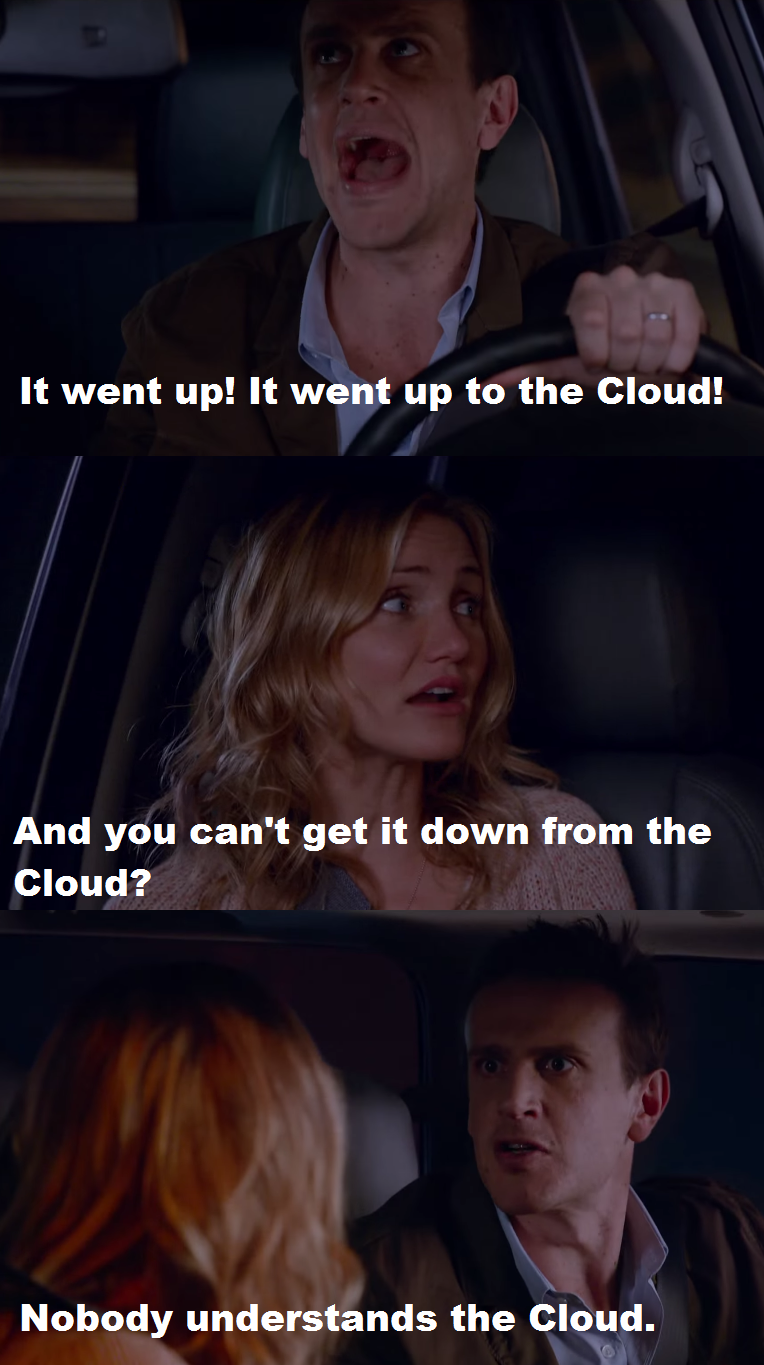
Putting information in “the cloud” isn’t just for your music and photos anymore. Businesses across the globe have been utilizing cloud based software for years, and there’s no reason you can’t either. An easy and cost-efficient solution that you can embrace right now is by switching over to services like Google Docs and Dropbox, two services that can handle all of your document and presentation based needs.

2. Wireless Computing Power

 d176aeba033335345ba4640fb5a7f7bb

Photo via Pinterest

Times have changed since the stylish briefcase laptop, but wireless computing power has always been a key factor in successful business practices. While a laptop centric team is always a good choice, you could take this a step further but investing in products like the Intel Compute Stick. This portable device plugs into any HDMI port you need, and provides the power of mobile computing in a small, effective device that will “wow” any office.

3. Wireless Conference Room Technology 

 technology_is_changing_things_for_both_teachers_and_students._6908795409

Photo via Giflingua

The bane of every IT professional: Going into a meeting room and being greeted by a host of unorganized wires and cords. Rather than make everyone awkwardly check their phones and drum the desk in front of them, why not invest in actual presentation technology? Ubiq’s own ‘Hive’ wireless presentation plugin gets rid of the need for additional cables and specialist IT personnel, meaning more time can be spent on getting the presentation right and less on worrying about technical problems occurring.


Want to set up a wireless Conference Room?Try Now

Meetings often get a bad rap. Sometimes it’s because they start late, run off course, or drag on past the ending time. Books have been written about how meetings suck, how they need to be run better or eliminated altogether.
But a good meeting can be the most effective way to clarify and update goals, align strategy and make critical decisions with the team, so it’s worth figuring out what makes for a positive experience.
Most of our collective attention focuses on the timing, the agenda and the participants involved. But one factor that’s often overlooked is the meeting space itself. The process of finding and reserving the right room for a particular type of meeting, then getting everything in that space to work properly, can upend what could have otherwise been a smooth, productive meeting.
Here are some aspects of the meeting room experience to think about:
1. A smooth room booking experience
Most professionals have found some sort of meeting scheduling tool that works for them. It might be a shared company calendar like Outlook or Google Calendar, or a standalone tool like Need to Meet or Doodle.
But unless those tools tie in to your company’s meeting room reservation system, they’re only doing half the job. What good is it to have an agreed-upon meeting time, if there’s nowhere to meet?
Even if the meeting is remote, users who work in an open office layout are still going to need somewhere quiet to take the conference or video call – and they’re going to need a phone, display screen or WiFi in that space.
That’s why the most productive companies have a meeting scheduling option that integrates with their room reservation software.
2. Reserved really means reserved
It happens all the time: Somebody reserves a meeting room through a shared calendar, but when they arrive for the meeting, someone else is in the room.
If the meeting schedule posted next to the room – if there is one – isn’t up-to-date, it’ll create scheduling conflict for employees. It doesn’t matter if the format is paper or digital, if the meeting information isn’t updated in real-time, people eventually start to ignore what it says.
If the meeting organizer is lucky or persuasive, the room squatter will clear out once they realize that another meeting was scheduled for that space and time. But if the person who’s already in the room is deep in conversation, the original meeting organizer has to decide between a few less-than-ideal options, all of which include the awkward dance of making uncomfortable faces and gestures to the other person:

  • Hover at the door and hope the discussion wraps up soon
  • Knock and interrupt
  • Find another space

Effective meeting scheduling signage benefits everyone: The people who are already holding a meeting don’t get interrupted with “are you almost done” inquiries, and the people who are arriving for the next meeting don’t have to stress about whether the room will open up in time.
3. The right room equipment
Whether it’s having enough chairs or functional presentation equipment, one of the biggest hurdles to efficient meetings is having the right tools. Research has shown that, of the total number of meetings that overrun their scheduled time, 21% of them run over as a direct result of problems with meeting room equipment.
This doesn’t always mean the equipment is broken. Often it’s a disconnect between the meeting organizer’s expectations or assumptions, and the reality of what’s available in the space they reserved.
This is less of a problem for smaller companies, where end users can remember which meeting rooms have which videoconferencing systems. But at bigger companies, where employees are less familiar with each room’s technology equipment, this kind of disconnect is responsible for hundreds of hours of lost meeting time every month or year.
Another way to help end users get the right spaces for their different types of meetings is to have a room scheduling system that allows them to sort and schedule based on what’s available in the rooms. Then they’re fully empowered to choose the right room for the kind of meeting they’re expecting to have, whether it’s a brainstorming session or a formal client presentation.
If all three of these bases are covered, your coworkers should be able to look back on their meeting room experiences as productive and professional – and save your IT department a lot of last-minute troubleshooting.
 
About the Author:

 Shaun Ritchie is the CEO and co-founder of EventBoard, and a firm believer that meeting rooms should just work. Follow him on Twitter (@shaunjritchie) or read more of his blog posts at blog.teem.com.