Want to set up a wireless Conference Room?Try Now

ebb9fe70-6e5d-405d-b6cd-de2ce72b4359

From the CIO

Gary Steen, CIO of TalkTalk, discusses the procedures his team implemented following a cyber attack that exposed the personal information of hundreds of thousands of customers.
Jan Willem-Brands of Barco extolls the virtues of the wireless conference room. “Meeting room technology needs to be upgraded and brought into the BYOD era,” he writes.
Want to increase productivity without spending money? R.L. Adams of Forbes argues that exercising self-restraint when it comes to browsing social media and playing mobile games is a much better strategy than purchasing a faster computer or tablet.

Technology News 

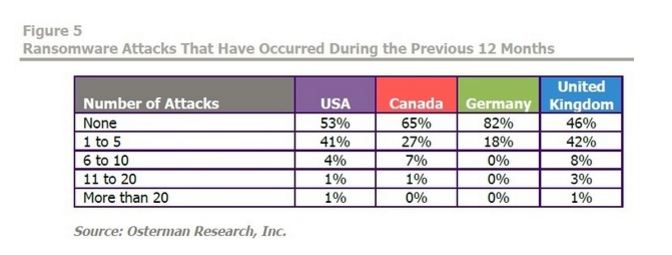
Is your business based in the United States? If so, there’s a 50% chance that you’ve been the victim of ransomware, a new study indicates.
Screen Shot 2016-08-03 at 6.18.51 PM
According to the New York Times, China is no longer following in Silicon Valley’s footsteps when it comes to mobile technology, but rather—thanks to apps like WeChat and Alipay—leading the charge .
Has your conference room devolved into an epicentre of boredom, frustration, and dread? Don’t worry: UBIQ has 5 quick tips to help you turn the situation around.

Want to set up a wireless Conference Room?Try Now

Ah, the conference room. What should be one of the most productive areas of your office often turns into an epicenter of boredom, frustration, and dread. “Ugh, another meeting? How long is this one gonna take?” Easy fix, all we have to do is throw a lot of high tech TVs and gadgets in there, right?
Wrong.
What a lot of companies tend to overlook is in fact the most important factor to consider when elevating your conference room to the next level: the people inside it. Although you may just see your conference room as a place where meetings occur, they can serve as the catalysts for office bonding or for the next big idea. If you’re looking to break the monotony of your business, check out these five tips on what it takes to make your conference room the productivity hub of the whole floor.
1. Your Colleagues
o-OFFICE-CUBICLES-facebook

via Huffington Post

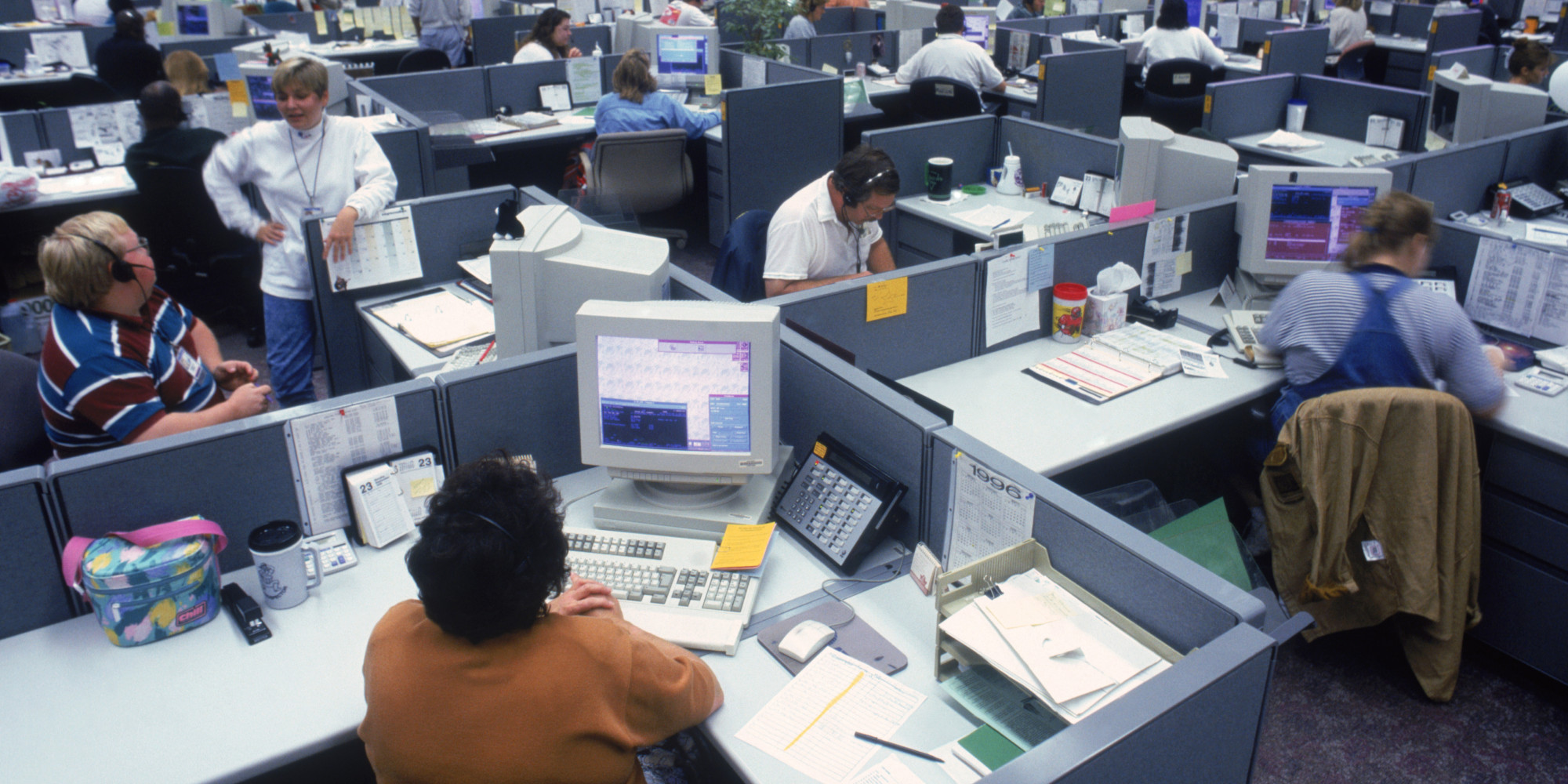
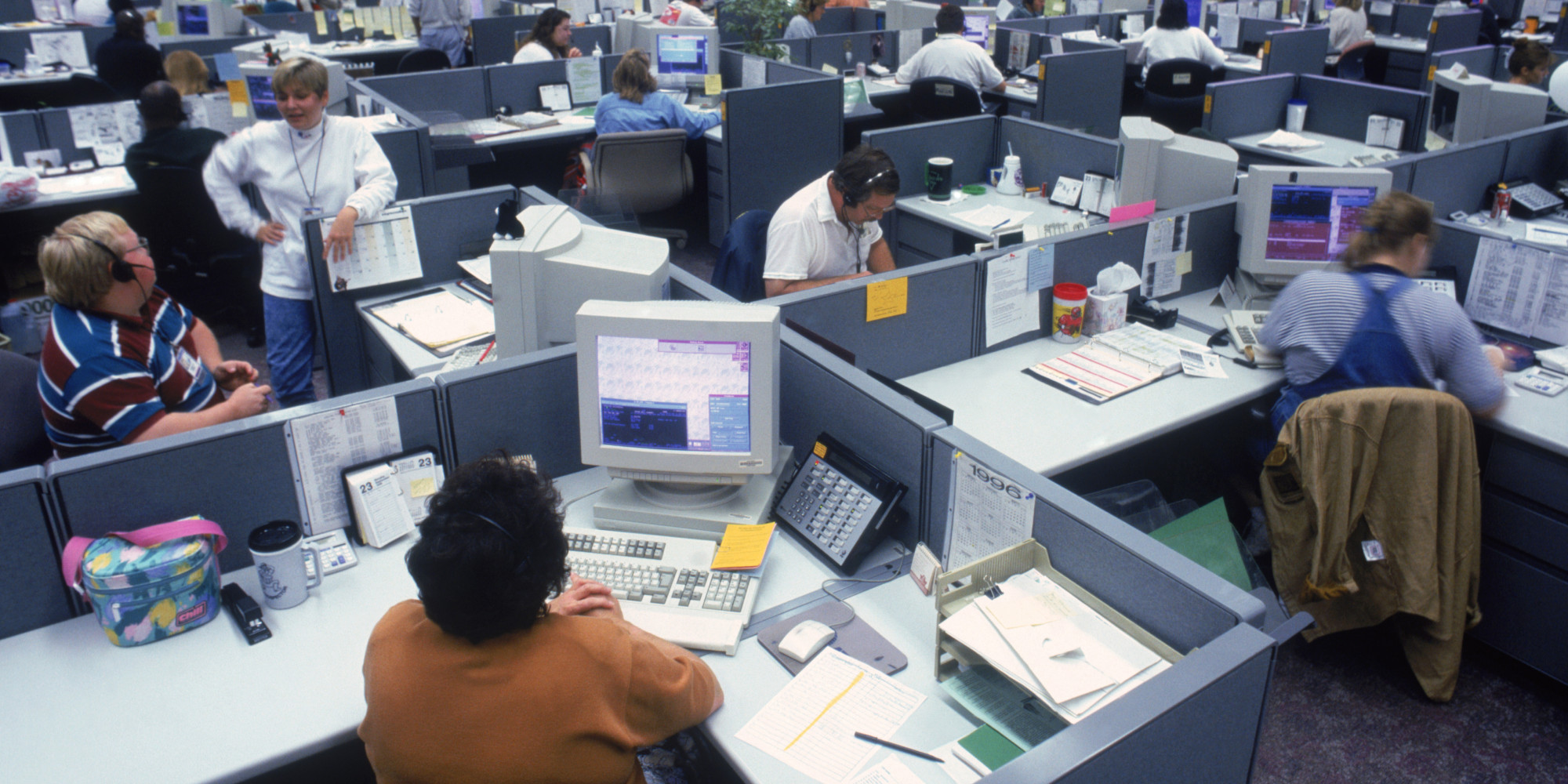
Sometimes it’s easy to get the above image in your head when you picture your colleagues, but it’s important to realize that they’re not just workers jammed into cubicles. Each person has their own way of completing projects, writing reports, and communicating around the office, which is why it’s in your best interest to find out what makes them hum. If you find that they’re loving the free coffee, but hating the way memos are sent out, start making some changes. You’ll see it reflected in the conference room in no time.
power rangers

via Foe

2. Bring Your Own Device
Company-wide computer setups can certainly be useful, but their success doesn’t always transfer over to the conference room. Supporting a Bring Your Own Device program in the workplace establishes a sense of comfort and familiarity that many of the not-so-tech-savvy will embrace with open arms. Plus, the new association between their favourite device and work might just encourage productivity out of the office as well. Everybody wins!
rs_500x235-140102133540-tumblr_inline_mxdzh0ekMK1rg0g8s

via EOnline

3. Help Desk Support
Now that you’ve got your coworkers embracing technology a little bit more, here comes the inevitable onset of crashed computers. Fear not! Taking the time to optimize your IT department will go a long way towards increasing productivity, starting with an IT ticketing system. By prioritizing high risk situations and opening communication between employees, you can expect to see a higher level of transparency in the workplace through efficient problem solving.
giphy

via Giphy.com

4. Functional Space
635934313858707314239385828_the-office2

via Bustle

I’m not talking about the “feng shui” of your conference room here, but rather how the employees of your company need the space to behave. Are people getting frustrated with a constant loss of Wi-Fi when they’re in there? Look into updating your network. Do meetings routinely start ten minutes late because of tangled wires? Try embracing wireless presentation technologies. No matter what changes you make, allow your employees to have a say, and watch the productivity soar.
 
5. Training
Fitness-Computer-Workout

via Magnifazine

This isn’t exactly what I had in mind, but investing your team in training will serve multiple goals. Now that you’ve discovered what technologies need to be implemented into the conference room, it’s up to you to provide clear and effective documentation so you can be as productive as possible. Additionally, your IT team will be needing to know what they’ll be dealing with, and training them prior to introducing the new tech will only optimize your conference room environment.
The final verdict? While you may find that investing in new and different technologies may ultimately benefit the workplace, improvement needs to begin with the people who will be using them. Keep an ear to the ground to discover what works and what doesn’t for your office, and look for ways to make the conference room a stimulating environment for everyone on your team. Be careful though; after following these tips, they may never want to leave!

Want to set up a wireless Conference Room?Try Now

622752fd-3751-4622-8cfa-6c56c90fa5ad
From the CIO
Oliver Bussmann of UBS and Level39 argues that the days of lone geniuses locking themselves away in rooms and inventing game-changing technology single-handedly are over. The future of innovation will be collaborative.
Liv Fiksdahl, CIO of Norway’s largest bank, discusses how outsourcing the equivalent of 500 full-time IT positions to India helped her reduce costs by nearly 60%.
Marty Miner, CIO of Leidos, reflects on the lessons he learned after inheriting an IT organization that was on the brink of disaster. “No one division in IT was responsible for ensuring IT operations and business continuity, and all the divisions were doing some type of development,” he recalls.

Technology News

Why do the children featured in this viral video assume that print magazines are broken iPads? Jonathan Margolis of the Financial Times discusses how technology is changing the way our brains are wired.
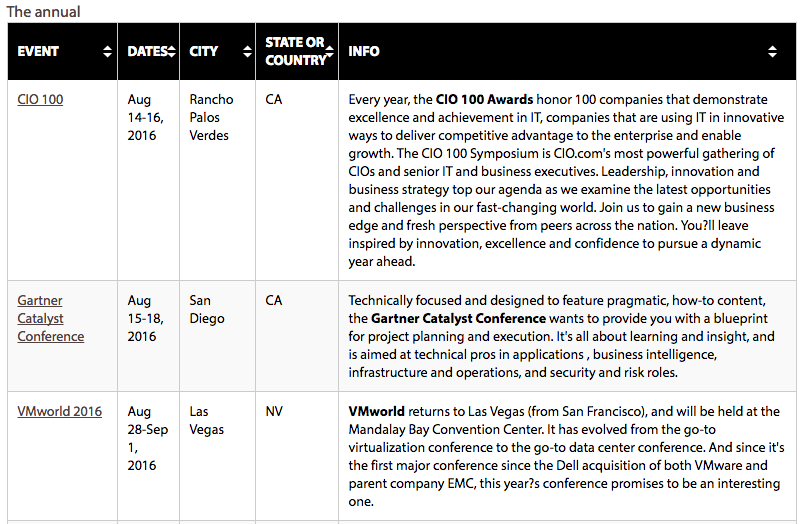
If you’re looking to stay up-to-date with emerging trends, expand your network, and redeem some of your soon-to-expire AirMiles (just five months until all of your pre-2012 miles vanish into thin air), CIO.com has you covered. They’ve compiled a sortable list of the fall’s most important upcoming tech conferences, not all of which will take place in Vegas.
Jacqueline Chan released a new blog article on ‘3 wireless technologies that can give your IT superpowers.’
Screen Shot 2016-08-02 at 6.44.48 PM

Want to set up a wireless Conference Room?Try Now

Let me guess: When you go home at night after a long day of work, you like to relax and kick back with your laptop or tablet, maybe catch a movie or show on-demand, and then read an e-book before you turn in. In addition to what sounds like a relaxing evening, you made it through the whole night with a notable absence: cords. You’ve been going wireless in your own home for years now, and the more you think about it, the more you realize that your business should be doing the same.

“But we already have laptops!” That may be true, but I can guarantee that you haven’t been utilizing wireless office technologies to their full potential. Here are three quick fixes that will spark an increase in productivity around the workplace:

1. Cloud Computing

ST-Cloud-LoL

Photo via GuidingTech

Putting information in “the cloud” isn’t just for your music and photos anymore. Businesses across the globe have been utilizing cloud based software for years, and there’s no reason you can’t either. An easy and cost-efficient solution that you can embrace right now is by switching over to services like Google Docs and Dropbox, two services that can handle all of your document and presentation based needs.

2. Wireless Computing Power

 d176aeba033335345ba4640fb5a7f7bb

Photo via Pinterest

Times have changed since the stylish briefcase laptop, but wireless computing power has always been a key factor in successful business practices. While a laptop centric team is always a good choice, you could take this a step further but investing in products like the Intel Compute Stick. This portable device plugs into any HDMI port you need, and provides the power of mobile computing in a small, effective device that will “wow” any office.

3. Wireless Conference Room Technology 

 technology_is_changing_things_for_both_teachers_and_students._6908795409

Photo via Giflingua

The bane of every IT professional: Going into a meeting room and being greeted by a host of unorganized wires and cords. Rather than make everyone awkwardly check their phones and drum the desk in front of them, why not invest in actual presentation technology? Ubiq’s own ‘Hive’ wireless presentation plugin gets rid of the need for additional cables and specialist IT personnel, meaning more time can be spent on getting the presentation right and less on worrying about technical problems occurring.


Want to set up a wireless Conference Room?Try Now

Meetings often get a bad rap. Sometimes it’s because they start late, run off course, or drag on past the ending time. Books have been written about how meetings suck, how they need to be run better or eliminated altogether.
But a good meeting can be the most effective way to clarify and update goals, align strategy and make critical decisions with the team, so it’s worth figuring out what makes for a positive experience.
Most of our collective attention focuses on the timing, the agenda and the participants involved. But one factor that’s often overlooked is the meeting space itself. The process of finding and reserving the right room for a particular type of meeting, then getting everything in that space to work properly, can upend what could have otherwise been a smooth, productive meeting.
Here are some aspects of the meeting room experience to think about:
1. A smooth room booking experience
Most professionals have found some sort of meeting scheduling tool that works for them. It might be a shared company calendar like Outlook or Google Calendar, or a standalone tool like Need to Meet or Doodle.
But unless those tools tie in to your company’s meeting room reservation system, they’re only doing half the job. What good is it to have an agreed-upon meeting time, if there’s nowhere to meet?
Even if the meeting is remote, users who work in an open office layout are still going to need somewhere quiet to take the conference or video call – and they’re going to need a phone, display screen or WiFi in that space.
That’s why the most productive companies have a meeting scheduling option that integrates with their room reservation software.
2. Reserved really means reserved
It happens all the time: Somebody reserves a meeting room through a shared calendar, but when they arrive for the meeting, someone else is in the room.
If the meeting schedule posted next to the room – if there is one – isn’t up-to-date, it’ll create scheduling conflict for employees. It doesn’t matter if the format is paper or digital, if the meeting information isn’t updated in real-time, people eventually start to ignore what it says.
If the meeting organizer is lucky or persuasive, the room squatter will clear out once they realize that another meeting was scheduled for that space and time. But if the person who’s already in the room is deep in conversation, the original meeting organizer has to decide between a few less-than-ideal options, all of which include the awkward dance of making uncomfortable faces and gestures to the other person:

  • Hover at the door and hope the discussion wraps up soon
  • Knock and interrupt
  • Find another space

Effective meeting scheduling signage benefits everyone: The people who are already holding a meeting don’t get interrupted with “are you almost done” inquiries, and the people who are arriving for the next meeting don’t have to stress about whether the room will open up in time.
3. The right room equipment
Whether it’s having enough chairs or functional presentation equipment, one of the biggest hurdles to efficient meetings is having the right tools. Research has shown that, of the total number of meetings that overrun their scheduled time, 21% of them run over as a direct result of problems with meeting room equipment.
This doesn’t always mean the equipment is broken. Often it’s a disconnect between the meeting organizer’s expectations or assumptions, and the reality of what’s available in the space they reserved.
This is less of a problem for smaller companies, where end users can remember which meeting rooms have which videoconferencing systems. But at bigger companies, where employees are less familiar with each room’s technology equipment, this kind of disconnect is responsible for hundreds of hours of lost meeting time every month or year.
Another way to help end users get the right spaces for their different types of meetings is to have a room scheduling system that allows them to sort and schedule based on what’s available in the rooms. Then they’re fully empowered to choose the right room for the kind of meeting they’re expecting to have, whether it’s a brainstorming session or a formal client presentation.
If all three of these bases are covered, your coworkers should be able to look back on their meeting room experiences as productive and professional – and save your IT department a lot of last-minute troubleshooting.
 
About the Author:

 Shaun Ritchie is the CEO and co-founder of EventBoard, and a firm believer that meeting rooms should just work. Follow him on Twitter (@shaunjritchie) or read more of his blog posts at blog.teem.com.

Want to set up a wireless Conference Room?Try Now

Today, most employees bring their own laptops to work, eliminating the need for a shared conference room PC. However, many companies still like it the old way and insist on having a shared PC in their meeting room even if it is more of a headache than of a help.
In fact, one of the major challenges for the IT professionals tasked with supporting conference room technology is maintaining shared PCs. Here are some reasons why companies no longer need a shared PC in their meeting rooms:
BYOD
The latest survey by Tech Pro Research shows that the Bring Your Own Device (BYOD) movement is booming, and over 74 percent of organizations are either already using or planning to allow employees to bring their own devices to work. This rising BYOD trend has resulted in immense benefits to both employees and organizations. It obviously improves opportunities for collaborations and makes meetings more efficient and straightforward.
BYOD also brings significant benefits to conference rooms. Sharing content across tablets and smartphones makes these devices useful for various meeting scenarios ranging from training to sales presentations to planning sessions.
Failure of PC as a Connectivity Hub
There are several effective methods for accessing content during a meeting such as connecting to a tabletop AV content, connecting directly to a display or projector, accessing files from USB storage device connected via DVI or HDMI cable portable storage, etc.
However, many of these methods frequently fail because they rely on the shared PC as a connectivity hub. Whether accessing files on the corporate LAN, connecting a USB drive, or accessing the web, the shared conference room PC has serious shortcomings, including constant software updates, long boot times, and complex login procedures. As a result of this, shared meeting room PCs or laptops can be nightmares for the IT support staff.
Compatibility Issues
By relying on a single shared PC or laptop to run a presentation, you open yourself up to the following scenarios: Not having the latest version of a software that supports a particular file, having to update to new software minutes before a presentation, and dealing with users who want to share documents that only run on apps compatible with Macs.
Quite often we see conference room users run around and stress out trying to figure out a way to get the presentation to run, especially if it contains some sophisticated attachments.
Requires Extensive Maintenance
The shared conference room PC often keeps the IT team on its toes. Making sure the laptop is in proper working order, that the cables are connected to the display, software is updated, and various other tasks eat up a lot of IT team’s time.
Eliminating the shared conference room PC and investing in a wireless presentation system can help businesses save on a lot of time, energy, maintenance expenses, and above all, make meetings much more productive and effective.
ADDITIONAL READING
Wireless Conference Rooms vs. Cabled Conference Rooms: Which Has the Better ROI? 
Top 10 Conference Room Cable Management Fails of 2016
5 Must-Have AV Products For Your Conference Room

Want to set up a wireless Conference Room?Try Now

As professionals, we spend about 62 hours of our lives attending meetings each month. One might conclude that meetings must be effective and enjoyable in order for us to dedicate so much of our time to them. But it doesn’t take a rocket scientist to know that this isn’t the case. We actually waste about 31 hours a month in unproductive meetings. We could be spending that valuable time with our families, practicing a hobby, or earning more money.
And it doesn’t just affect us as individuals, it affects our businesses too. Unproductive meetings are costing our businesses time and money. In fact, an overabundance of crappy meetings are the number one cause of death to startups.
With that information said, one will likely conclude that this needs to change. But the question that lingers is, “How?”
Until recent times, we lacked the information to determine how to create better, more efficient meetings. The “Big Data Revolution” is completely changing this by giving us enough data, and enough information to answer all the questions we can come up with. More and more companies are beginning to realize that data analytics can be used in the meeting room, to cut out inefficiencies and make meetings more engaging and productive. Meeting analytics enable businesses to maximize the value of their resources, save time and money, and improve the credibility of a company.
Here are the top 5 reasons why meeting room analytics are so important:
1.Coordinating Logistics
From start to finish, planning and executing a meeting takes time. Even scheduling a meeting can take a million years. It’s difficult and timely to coordinate all the logistics: from coordinating attendee’s schedules’, finding an available room, with the right number of chairs and with all the tech and resources you need for the meeting.
You may find a time that works schedule wise, so you book the room, but find that this meeting is consistently running late. Do you know why? Could it be because people are having to rush over from another meeting, on the other side of a building? Or is it something else?
Meeting analytics help us quickly and easily coordinate the logistics of a meeting; but more importantly, they are scheduled to run more efficiently.
2. Identifying Inefficiencies
Meeting room analytics tell you what’s working, and what’s not. They give you accurate and real-time feedback on the meeting environment, logistics and attendees. They can help you answer questions and identify problems you may never have even thought of.
Are your meetings running ten minutes late because people are rushing over from another meeting? Or is it due to hard-to-use technology? Could it instead be because the presenters are constantly having to reconfigure device settings?
Using meeting analytics, you can answer these questions, so you can save those ten minutes every single week.
3. Get the Most Out of Your Space
Leasing space is not cheap; it is a major fixed cost for most companies. So, you want to make sure you are getting the most out of the space you have; but you also want to make sure you aren’t wasting money on unused space.
Meeting room analytics help businesses identify the most efficient use of space. Are some conference rooms being used more than others? Do you know why? What is it about that room that people like? Do you have enough conference rooms? Do you have too many?
For example, if you have trouble finding available conference rooms, you might come to the conclusion that you need to expand. However, it could be that the meetings are just not coordinated and timed properly. This insight could save you thousands a month.
4. Increase Productivity
As noted, meetings are notoriously unproductive…but do you know why? Is it because there are too many people in the room? Are people getting off-topic? Are you having the meeting too early or late in the day? Do the attendees have enough data and information to know what’s going on and to make a good decision? Would the meeting be more productive if it was held a week later? Or are people just bored?
Using analytics, you can identify which of these scenarios is causing an unproductive and inefficient meeting.
5. Identify Problems. Identify Solutions.
Now let’s assume you have discovered that your meetings are unproductive because people are bored. Well, now what? How do you solve this problem? How can you engage attendees? Luckily, analytics don’t just burden you with identified problems, but now, they can even help you identify solutions to those very problems.
Mobile event or meeting apps can combine the data they track with unstructured, external data (such as social media), to identify what people are talking about, and what interests them. The consolidated data will help you identify what topics and types of content audience members enjoy and engage with, and what they don’t. They can identify hot and trending topics to keep people interested, and even identify key connectors that you should have attend the meeting.
Then, or course, once the meeting begins, analytics tools will tell you in real-time if your adjustments are working. Meeting room sensors are able to track audience engagement, and provide users with that information in real time; and in the very near future, they will be affordable and accessible enough for just about any business. Learn more about the future of meeting room analytics here.

Want to set up a wireless Conference Room?Try Now

If you have ever had the pleasure to work on an IT team, you would have realized how overworked they are, how much time they have to spend doing tasks that are not really important or can be done by others if they have better training and understanding of system. There are several tasks that keep the IT team away from their work. Here are some of them:
1. Preventable incidents
Merely by educating the users better, a lot of time spent on dealing with preventable incidents can be saved. If only we could count the number of requests that an IT team receives on an average, we would know that a large percentage of them would never arise if the users were a little more aware of what they were doing. It makes sense for businesses to invest in user education and training rather than wasting valuable IT work hours each day in dealing with a bulk of requests that can be easily prevented.
2. Struggling with outdated equipment and software
Whenever there is a meeting or conference in the workplace, a member from the IT team is always summoned to make sure the laptop that the client/contractor has brought in to deliver the presentation connects with the projector, or that the virtual conferencing system works properly. With better and modern technology that supports BYOD, these tasks can be eliminated.
3. Manual tasks
In most organizations, one of the biggest challenges IT teams have to face is that a large quantity of tasks such as updates, software installations, enhancements etc. have to be done manually. This eats into a lot of valuable time for the IT people. By implementing solutions that assimilate these tasks, we can spare IT teams a lot of trouble and time.
4. Fire-fighting
Most IT people spend a large part of their day firefighting. Oftentimes, urgent issues such as a particular equipment not working, takes precedence over what is actually important. Although these sudden, unexpected events cannot be completely prevented, but there needs to a stronger focus on reducing the occurrence of such incidents.
5. Tasks that are out of their scope of duty
Given the talent and curiosity that IT teams possess, they frequently end up resolving issues that fall out of their scope of duty. This keeps them away from tasks that they should actually be performing.
6. Discretionary activities
In a research published in Harvard Business Review, PA Consulting Group productivity expert Jordan Cohen and London Business School professor Julian Birkinshaw indicate, “Our research indicates that knowledge workers spend a great deal of their time—an average of 41%—on discretionary activities that offer little personal satisfaction and could be handled competently by others. So why do they keep doing them? Because ridding oneself of work is easier said than done.” According to this study, we tend to cling to tasks that make us feel busy and important, and for obvious reasons, the bosses pile on as many responsibilities as the workers are willing to accept. This happens with IT people as well. They end up having a lot more on their plate, and many of them are tasks that keep them away from their actual work.
This list is far from exhaustive. There are many other tasks that keep IT teams away from their work, and in order to make teams more productive, there needs be a larger focus on streamlining work processes better, training users, and investing in latest technology.

Want to set up a wireless Conference Room?Try Now

Our future of meetings looks bright. Based on research from a variety of sources, experts and professionals, we can expect meetings in 10 years to look like something from Star Trek, to be as personalized as our Starbucks order, to be as comfortable as our couch, and to be as engaging as Candy Crush.
In a world that is more social, more innovative and more collaborative than ever, we are due for a disruption in our meetings. Although the world of meetings has been constantly evolving over the last ten years to keep up with our expectations, our expectations continue to grow exponentially. Changes in both technology and social/human behavior will drive the changes we predict to see in the future of meetings. The two cannot be separated, as technology drives human behavior and human behavior simultaneously drives technology.

  1. Sensors and Analytics

Small, unnoticeable sensors will be strategically placed throughout meeting rooms to measure the audience, and the room. These sensors will provide us with “engagement metrics,” giving us real-time data on the audience’s heart rate, stress levels, eye movements and more. Using this data, we can determine if the room is too hot or if the audience is engaged enough.
Because we will get this data in real time, we have the ability to make quick adjustments in just a matter of minutes, or even seconds. Which brings us to the next point.

  1. Flexibility and Personalization

In a world where we have so much content and so many resources available to us…we are developing a liking to personalized experiences. We have elaborate coffee orders, we expect to see only ads on YouTube that are relevant to our lives, and we only read blogs we are interested in. As of now, most meetings do not yet fulfill this expectation – but 10 years from now, we will master this.
We can expect to replace those programs and booklets with a platform that allows for a personalized meeting experience. There will be multiple pieces of content that express the same concept, and even in different forms, that each audience member can choose from.
Some predict that event apps will no longer exist. However, I completely disagree. Apps have become such a big component of our lives, they cannot simply disappear. Instead, they will evolve. The event apps of the future will provide a personalized experience as explained above. They will also be able to link with social media and LinkedIn, to make recommendations of who we should introduce ourselves to, what table to sit at, and inform us if there are people there that we already know.

  1. Attendance-Focused

In such an individualistic society, it may (or may not be) surprising that we are developing more and more of a desire to find a sense of community. The internet of things, is helping us achieve this today on a whole new level; apps and social media sites gather data about us that enables us to compare our data to others’ data; thus enabling us to find commonality, and to find others with similar interests and perspectives.
But it’s not just about forming online communities. More and more we are turning those online communities into real-life, face-to-face communities. There are meet-up groups and online dating apps abound.
We can only expect this trend to continue; and it will work its way into our meetings. As our desires for finding community grow and evolve, we will be more concerned about who we can meet at events and meetings, rather than the content or speakers.
And as mentioned before, we will have apps to help us connect with people. The meeting and event app or platform will use attendee data, to provide us with suggestions on where we might like to sit. It will help connect us with others interested in the same things as us, and will ultimately boost our networking, by providing a personalized networking experience.

  1. Holographic Telepresence

Immersive telepresence is used today, providing us with a heightened emotional and physical experience.
Immersive telepresence is the physical embodiment of another person (meeting attendee) that is on a screen. The attendees are the same size as a person, and it feels more as though you are in the same room as them, compared to traditional Skype-like meetings. Here is what this technology looks like today:
As we continue to innovate, this will reach a whole new, futuristic level: holographic telepresence. The holographic display of a person will make it really feel like the person is in the room with you. You’ll be able to read their facial features, and they will be able to express themselves using body language.
You may be thinking that this seems a little far-fetched, and a little too futuristic – like something from Star Trek. I thought this too at first, but I can assure you that it is real. In fact, we already have this ability. Here is a video of a holographic presentation back in 2011. Now imagine what this will be like in ten years…