Want to set up a wireless Conference Room?Try Now

Every year, CEOs and other company leaders cite increasing revenue or acquiring new clients as their top priority. However, many overlook key changes that they need to focus on first in order for those goals to be viable. To succeed in 2017, the leadership team needs to start caring about these 5 priorities now.

1. Employee Development

Your employees are the lifeblood of your organization. They manage the day-to-day processes that keep your company running. However, a recent report from CareerBuilder reveals that over 21 percent of employees may be entertaining new job opportunities this year. That is an increase of 5 percent from last year. In 2017, it is crucial for company leaders to focus more on their employees, specifically on their development programs.
Last year, 41 percent of individuals reported that they wanted to better their career, and it’s doubtful that figure has changed in the last 12 months. It is crucial for companies to offer employees development tools and opportunities and challenge them in a healthy way that promotes their own personal growth and development.

2. Cyber Security

Security is no longer simply a concern for IT departments or third-party providers. Company leaders need to care about data security in 2017. In the past three years, the global cost of data breaches has broken record levels, according to the Ponemon Institute.
Plus, a cyber attack can be nearly impossible for companies to overcome. Organizations need to earn back the trust of employees, customers, clients, and others that may be affected by it, a feat that is impossible for most. Cyber security is a company-wide issue, and the entire executive team needs to be involved in training, planning, and responding to it.

3. Innovation and Transparency

Technology has completely transformed businesses today, and it will continue to change in the coming years. Advanced collaboration tools, social media, and data analytics have opened up more offices to a culture of innovation and transparency.
Employees and customers increasingly value a brand’s trust and honesty. In order to build that trust, companies need to show employees that they value the opinion of their constituents and to provide them with opportunities to share them.

4. Mobile Technology

More businesses are trading in their desktops for laptops and tablets.They are unplugging their meeting room cables and projectors and upgrading to wireless presentation solutions. Embracing mobile solutions in the workplace is one of the most important priorities for company executives this year. Based on a Harris Poll report, over 90 percent of IT leaders say enterprise mobility is a critical function to overall business performance. Both customers and employees want more mobile tools, and executives need to take notice.

5. Customer Experience

This year could be known as the “year of the customer”, according to several reports. A study by Accenture found that improving the customer experience is the top focus and motivator behind digital transformation. In the study, both B2C and B2B organizations named improving the online customer experience as one of their top priorities for the coming year.
Customers want their experience to be integrated seamlessly, whether it is in-person or through digital means. They also want it to be personalized for them. In order to meet new customer expectations, each member of the leadership team needs to get involved.
Ultimately, leadership teams want their businesses and their revenues to grow in 2017. When leaders start caring about things like customer experience and mobile technologies in the workplace, they will be more likely to reach those goals.
ADDITIONAL READING
The Magazines CIOs/CTOs Should Be Reading
5 Must-Have AV Products For Your Conference Room
Conference Room Design: A Guide For the Perplexed
Want to set up a wireless Conference Room?Try Now

Of all the tricks, hacks, and shortcuts that you can use to make your conference room cables look presentable, the best and most efficient is to simply throw them in the garbage and switch to a wireless presentation system.
But failing that, the second best solution is to invest in a conference table connectivity box (or, for businesses that have multiple conference rooms with large-sized tables, dozens and dozens of conference table connectivity boxes).
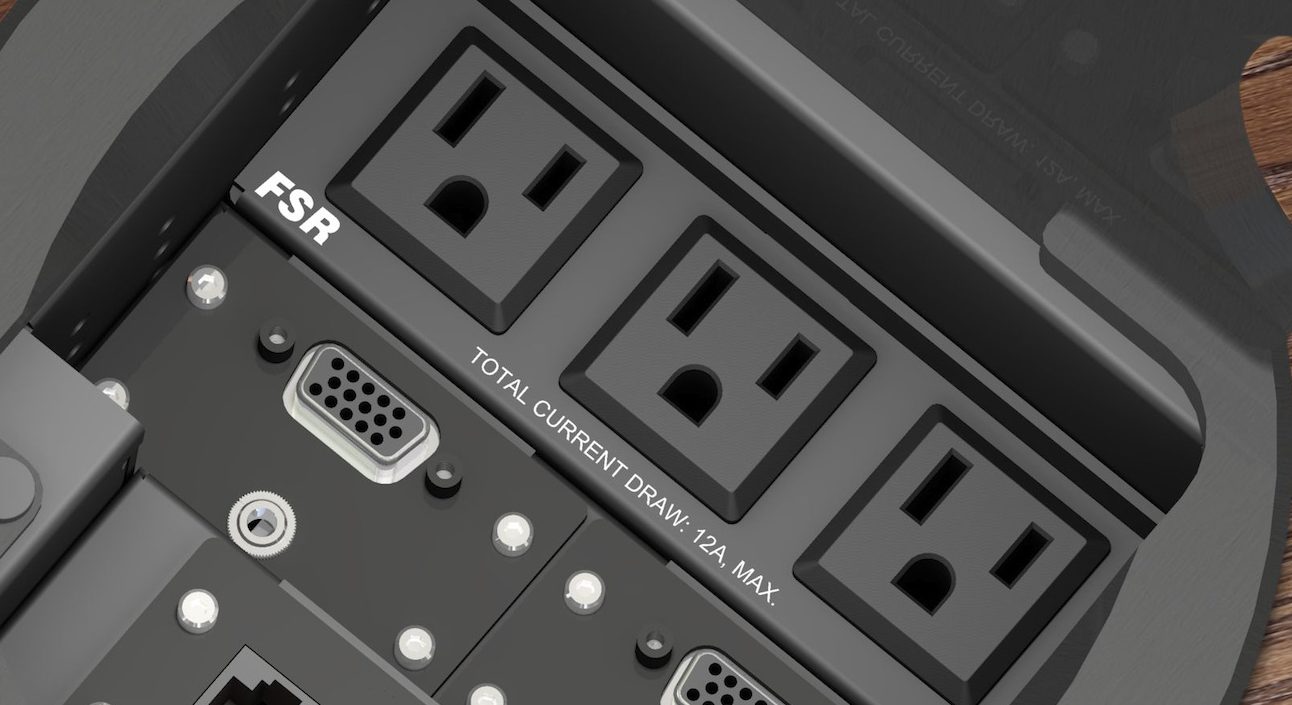
Retailing for roughly the same price as a new iPad, the conference table connectivity box fits snugly into the center of your meeting room table (although you may have to drill a hole first) and provides your end users with a wide array of video inputs to choose from. If one end user has a VGA port on their laptop and another user has an HDMI port and a third user has a mini DisplayPort, there’s no need to panic: As long as you have the relevant cables on hand, they can all plug in directly to the connectivity box rather than get up and connect to the back of the conference room TV or projector.
But not all conference table connectivity boxes are the same. There are only so many ports that you can fit into a box that’s 9 inches by 7 inches and not every connectivity box will have the inputs that you require. Here are the 7 ports that you’ll need most urgently.

1. HDMI

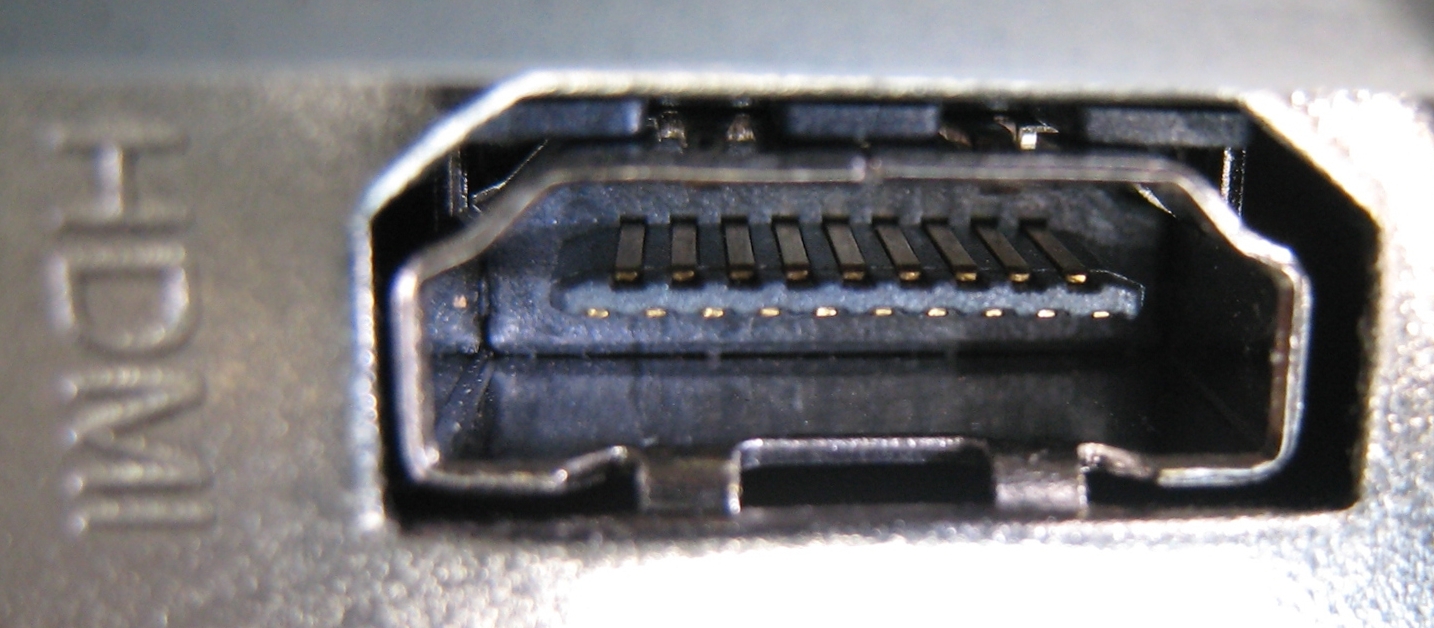
The most useful output for your conference table connectivity box: HDMI port

First introduced in 2003, HDMI became the dominant video cable around 2007 and has held its grip on the market ever since. If your conference table connectivity box has just one video output, make sure it’s an HDMI.

 2. VGA

Prior to HDMI’s 2007 takeover, VGA cables were the king of the land. In this day and age, buying a new laptop or projector that has a VGA port is about as challenging as buying a new, factory-sealed VHS player. Even so, there are still a surprising number of perfectly functional laptops and projectors kicking around that rely on them, and the odds that one of these devices will end up in your conference room are not insignificant. By having a VGA input in your connectivity box, you will be adequately prepared for this scenario (provided, of course, that you also have a VGA to VGA cable on hand).

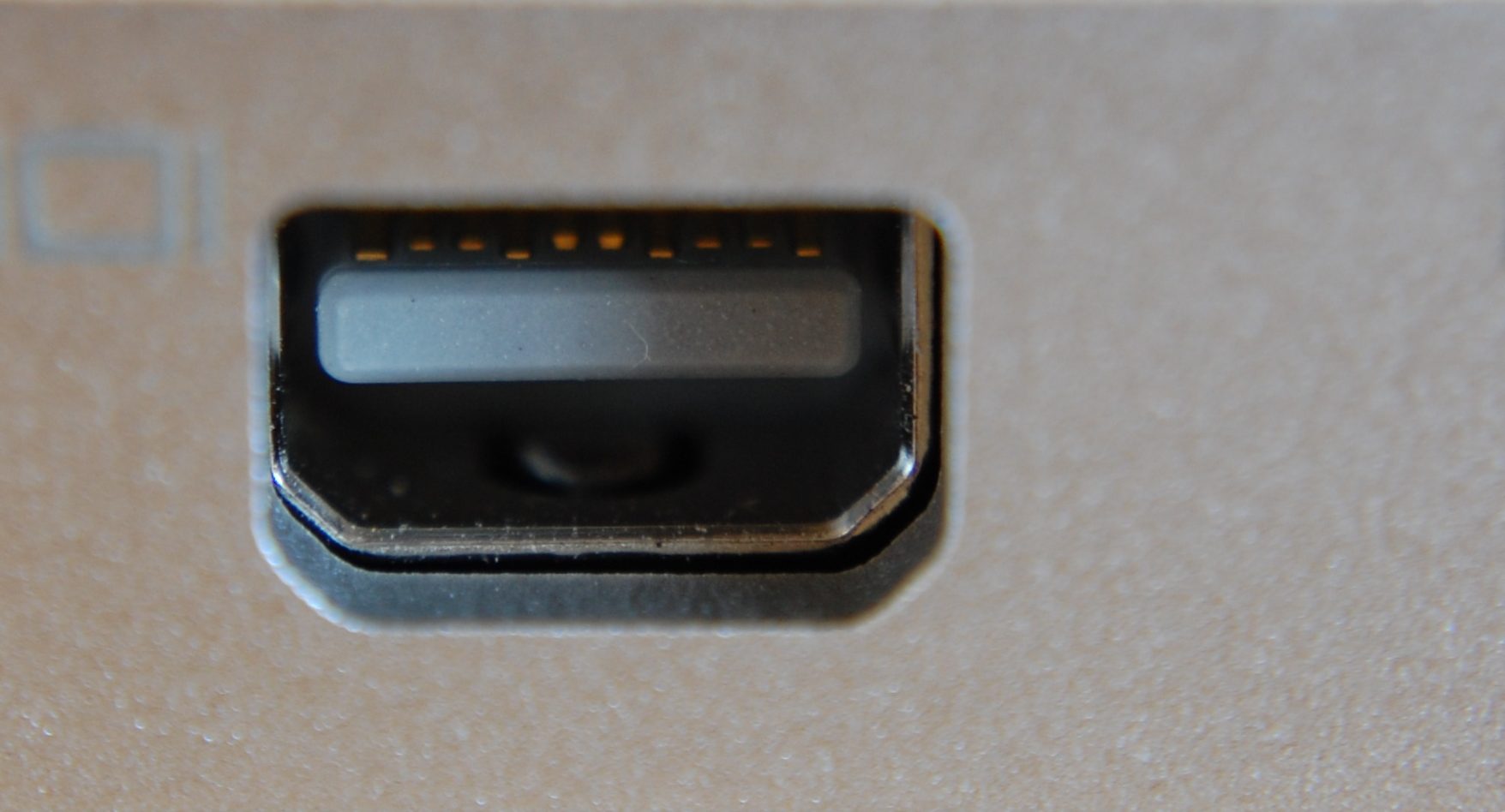
3. mini DisplayPort

Apple first introduced the mini DisplayPort in 2008 and by 2013 it was a standard feature on all Apple computers. Earlier this year, however, Apple began phasing the port out.
Given the extremely large volume of devices currently in circulation that have mini DisplayPorts but no HDMI or VGA ports, it’s a good idea to make sure your conference table connectivity box is equipped with this input. It may not be till 2030 that the last laptop with a mini DisplayPort stops functioning.

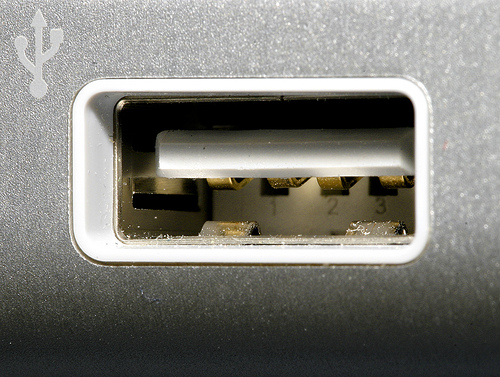
4. USB


The history of USB cables is a bit like the plot of the movie Tinker Tailor Soldier Spy: You need to carefully read its Wikipedia page three times in order to understand it. But you don’t need a firm grasp of its history in order to realize why it might be needed in the conference room: It’s a universal industry standard that plugs into just about anything.

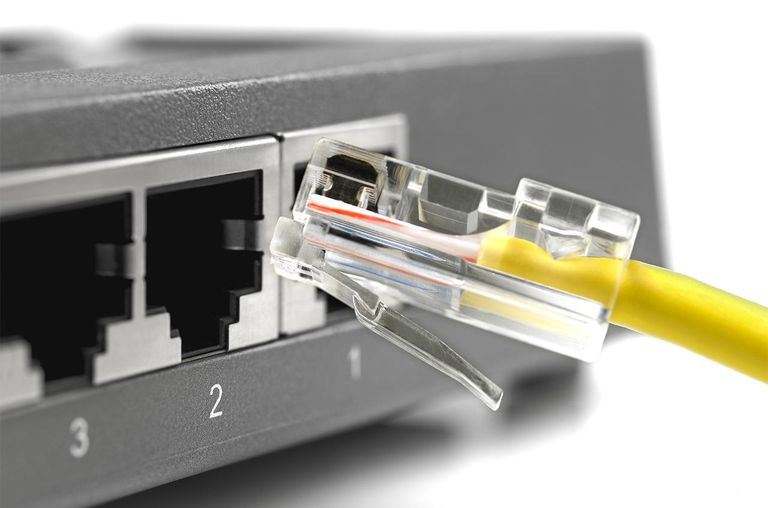
5. Ethernet

You should probably make sure your conference room connectivity box has an Ethernet port.
Since all laptops are capable of connecting to Wi-Fi, it’s difficult to imagine why your end users would need an Ethernet port. But after browsing through a list of all of the connectivity boxes currently on the market, it quickly becomes apparent that they all come with Ethernet ports, so there must be some sort of demand for them.

6. YPbPr component video


Likewise, it’s difficult to imagine why anyone would need to connect a VHS player or miniDV camcorder to a conference room TV or projector. But since the vast majority of connectivity boxes come with this input, it’s only reasonable to conclude that VHS-based business presentations are far more common than one might initially assume.

7. AC


Of course, all of these inputs are useless to a laptop that isn’t powered on. True, most laptop batteries last at least 2 – 5 hours. But you already have six plugs in your connectivity box, so there’s no harm in throwing in a seventh for good measure.

Other Things To Consider

Once you’ve drilled a hole into your conference room table and installed your connectivity box, your journey toward a presentable-looking conference room is almost complete. All you have left to do is to run the seven aforementioned cables through some cable management boxes, under your carpet, and along your baseboards. For more information on how to do this, please consult our conference room cable management checklist.
Or, if this whole process sounds like too much of a hassle, you may want to look into switching over to a wireless presentation solution that allows your end users to instantly connect to the TV or projector no matter what type of video outputs their laptops have. It only takes 10 minutes for IT to install, and you don’t have to mutilate your conference room table with power tools to do it.
ADDITIONAL READING
Picking a Conference Room Name: 5 Tips to Help You Get Started
Top 10 Conference Room Projectors of 2017
Conference Room Design: 10 Examples Worth Studying
 

Want to set up a wireless Conference Room?Try Now

The average cost of an HDMI cable is $10 – $15.
At first glance, this may seem like a pretty sweet bargain. For the price of a movie ticket or a foot-long submarine sandwich, you can buy a piece of equipment that easily attaches to the back of your conference room TV and instantly solves all of your connectivity issues forever.
What’s not to like?
Well, consider the following statistics:

  • Despite the prevalence of HDMI cables in enterprise conference rooms, 87% of IT managers report that problems connecting laptops to the TV is one of the top 3 issues that they are called on to deal with.
  • 88% of end users complain about meeting room equipment.
  • The average IT manager is called upon to resolve 8.6 meeting room technology problems per week. That’s 447.2 incidents per year.
  • The average meeting room technology problem takes 23.1 minutes for an IT manager to resolve. That’s 3.31 hours per week or 22.95 days per year.

Why so many problems with cables?

In today’s BYOD environment, end users give presentations from their laptops, and not all laptops have HDMI outputs. Some have VGA, DVI, Thunderbolt, etc. This means that in addition to HDMI cables, IT managers also need to have a small arsenal of alternative video cables and adapters on hand at all times. All of those $15 cables and adapters can add up fast, and good luck making them look presentable: The art of conference room cable management is an extraordinarily difficult thing to master. (So much so that many IT teams end up hiring AV installation companies to do the job for them).
Consider some more statistics:

  • In addition to the 23 days per year that IT managers waste solving cabling issues, employees waste 15.5 days a year in unproductive meetings.
  • 90% of presenters prepare for technology failure (such as printing off handouts in case screen sharing doesn’t work), and 44% do a tech rehearsal beforehand
  • Atlassian estimates that the salary cost of unproductive meetings for U.S. business is $37 billion.

So while the cable itself may only cost as much as a movie ticket, the true cost of cables—once salaries, wasted time, and AV installation costs are factored in—is much closer to a full-on movie production.

What about wireless conference rooms?

Unlike their cabled counterparts, wireless conference rooms don’t require constant troubleshooting, and therefore enterprises don’t hemorrhage money by deploying them. Although the initial cost of a wireless presentation system may be a bit steep compared to the $15 you’d spend on an HDMI cable, the amount saved in the long run is gargantuan. As far as ROI is concerned, wireless conference rooms are to cabled conference rooms what law degrees are to lottery tickets.
But there is a bright side to using cables: IT managers report that they walk a distance of 92.5 meters from their desk to the meeting rooms and back each time they have to go to help with a meeting room technology incident. This means they walk at least 3.2 km per week or 41.366 km per year.
With all that exercise, who needs a gym membership?
ADDITIONAL READING
Conference Room Cable Management Checklist
Top 5 Conference Room TVs of 2017
Death of the Shared Conference Room PC

Want to set up a wireless Conference Room?Try Now

If a business person from the 1950s were to set foot in one of today’s conference rooms, there’s a good chance they’d mistake the conference room equipment for the control panels of a spaceship.
Whereas the conference rooms of the 1950s mostly consisted of tables, chairs, and lamps, today’s conference rooms feature a cornucopia of advanced technology: digital projectors, HD TVs, videoconferencing systems, wireless speakers, microphones, and fancy LED lights.
For most of us, this technology lost its novelty a long time ago. Videoconferencing, once an idea as outlandish as teleportation, is now widely accepted as just another everyday fact of life. But for people of our grandparents’ generation, our conference rooms are something out of Star Trek.
All of this technology presents an enormous double edge sword for IT managers. On the one hand, it can be a powerful tool for collaborating with people on the other side of the planet; on the other hand, it can also be a powerful tool for creating spaghetti-like nests of cabling that trip people up and limit chair movement.
How can you simplify things? Here are 4 steps.

1. Assess Technology Needs

Much is demanded of today's conference room

Find out who uses your conference rooms the most and what they use them for. Are they mostly used for staff gatherings to hammer out project details, or do they use conference rooms to impress clients? Do conferences take place in person, or via video conferencing? How much square footage do you have? Are your presenters comfortable bringing their own technology to meetings?
Ultimately, you will need to ensure your conference room equipment provides technological flexibility and dependability, so no matter what a presenter needs, it can be arranged quickly.

2. Bring Your Own Device (BYOD)

One way to cut back on conference room equipment is to encourage users to bring their own. Not only does it eliminate the need for a shared conference room PC, it also saves end users the hassle of transferring their presentations from one computer to another and then verifying whether or not the presentation runs properly on the new computer.
However, in some industries and situations, security concerns make BYOD solutions impractical or impossible. Plus, you have to ensure your projection equipment is compatible with a variety of apps and devices. BYOD can work, but it may be trickier than you expect.

simplify your conference room equipment by enabling a BYOD policy


3. Banish Cables and Switch Boxes for Your Screen and Projector

In addition to throwing out your shared conference room PC, you may as well throw out all of your cables, connectivity boxes, and cable management boxes. By implementing a wireless presentation solution in your conference room (such as, say, Ubiq), your end users can send their laptop screen to the TV or projector with one click of a button.
While the majority of wireless presentation solutions don’t meet the security standards of most enterprises, we know of at least one wireless presentation solution (hint: it’s Ubiq) that does. Not only does Ubiq integrate multiple networks (so guest users can stream over the guest network and internal users can stream over the corporate network), it also comes with a centralized Dashboard that allows IT to implement other security measures (such as requiring end users to enter a four digit PIN in order to stream).
For most things in life, less is more and the same should apply to your conference room equipment.

4. Select Conference Room Furniture With Care

For IT managers who insist on having a cabled conference room, hiding cables is tricky but not impossible. Tables with hidden flip-tops, switches, and outlets to assist with cable management are readily available from most furniture retailers. For more information on how to hide cables, please consult our conference room cable management checklist.

Conclusion

Technology presents us with opportunities for collaboration and sharing that are unprecedented. With nothing more than the piece of plastic, glass, and wire that you carry around in your pocket every day, you can communicate and share information with people sitting next to you, people halfway around the world, or both simultaneously.
But your phone, tablet, or laptop will only take you so far. To share your screen with a room full of people, you either need cables and adapters or a wireless presentation device. Cables and adapters will ensure a solid connection (if you can figure out which output and adapter to use), but take up space and look ugly. It is therefore our conclusion that a simple, elegant conference is a wireless one.
Additional Reading
Meeting Room Equipment Checklist
5 Must-Have Items For Your Conference Room

Want to set up a wireless Conference Room?Try Now

The era of working in an isolated office cubicle all day may soon be over. More and more companies are knocking down their cubicles in favor of open or collaborative working spaces. But where we spend our time in the office isn’t the only thing that is changing either. How we work has transformed substantially in the last decade. Team projects, giving and receiving feedback, peer-editing, and other collaborative trends are becoming the norm for most workplaces. The importance of collaboration tools in the workplace is growing, and in 2017, their implementation will be one of the top priorities for companies. Here’s why:

Work is completed faster

According to the Harvard Business Review, 82% of professionals report that they need to partner with others throughout the day to complete their work. However, finding meeting space or planning in advance is difficult. In a typical workday, over 70 percent report wasting at least 15 minutes searching for space.
Online collaboration tools have helped to solve this problem by making working together on tasks easier than ever before. Individuals don’t need to be in the same room or even in the same country to collaborate on and edit projects. With video conferencing, meeting room software, and wireless presentation systems, team members can create, edit, and lead presentations without needing to meet face-to-face, and collaborate more efficiently during meetings where they do need to meet face to face.

Employees are more engaged and happy

Collaboration helps to foster teamwork and brings employees together, which makes a huge impact on their overall happiness. For many, the time spent in the office exceeds the typical 40 hour work week. It could even exceed the hours outside of the office. With so much time at work, employee satisfaction is crucial.
Several studies have shown that having work friends makes individuals more engaged and happy. One study claims that connecting with colleagues could bring more happiness than earning an extra $100,000 a year. Furthermore, when employees are happy and engaged, they are less likely to leave their current positions and more likely to be high performing, valuable members of your team.

Knowledge sharing creates higher quality end products

Two heads are better than one is more than just a saying. When two or more people work together on a project, they are more likely to reach or surpass their goals. According to ClearCompany, 86 percent of employees and executives cite lack of collaboration as the number one cause of business failures.
On the other hand, when teams collaborate and communicate effectively it can boost morale and motivation, as well as produce higher quality end products. Over 26% of individuals in a global study said that discussing success with co-workers motivates them. Collaborative environments, open meeting room setups, and new conference room technology allow individuals to share knowledge and give feedback in real-time. They can improve upon projects as they work on them, instead of at the end, when it is too late to revise.
It is becoming common for people to share ideas and complete projects and other work-related tasks in teams rather than alone. Those that still isolate themselves in cubicles and private offices are missing out on opportunities to exchange knowledge and expertise with colleagues. Whereas organizations that provide employees with collaboration tools and opportunities are gaining the competitive edge that they need to succeed in the future.
 

Want to set up a wireless Conference Room?Try Now

Dearly beloved, we are gathered here today to mourn the loss of the shared conference room PC, a device which leaves in its wake an imposing and far-reaching legacy. Although this legacy is mostly built on a foundation of headaches, frustration, despair, we must remember that the device did work on occasion. And when it worked, it worked well. Or at least semi-well.

To say that the shared conference room PC left us too soon would be wildly inaccurate. Nor can any of us say with a straight face that it will be missed. But to openly gloat over its demise at its own funeral service (as many of us here are no doubt tempted to do) would be tremendously undignified. It is therefore with the utmost solemnity that we extend our condolences to its surviving relatives—the conference room chair, the conference room table, and the dry erase board.

From the moment it was first introduced into the conference room, the shared PC demonstrated a faint glimmer of potential. In fact, for end users who finished their PowerPoint projects a day prior to their presentations, it was almost the ideal solution. All the end user had to do was e-mail the PowerPoint file to the IT department, who would then load it onto the shared PC, and—provided that there were no compatibility issues—the presentation would be ready to go.

Sure, it didn’t always work seamlessly. Login procedures were complicated, boot up times were slow, and software updates were constant. But it got the job done most of the time. Who here among us could have predicted that it would flame out in so spectacular a fashion?

Then came the BYOD era and, along with it, the beginning of the shared PC’s sad decline.

When your laptop screen can be shared wirelessly with just one click of the button, why bother sending your PowerPoint to the IT department 24 hours in advance? What if inspiration strikes you on the morning of your presentation and you want to make a revision? Then you have to send IT a new version and cross your fingers that the old version doesn’t play by mistake. Sorry, but no one wants to go through all of that.

From IT’s perspective, the benefits of ditching the shared PC were even more obvious. Why go to all the effort of making sure the shared PC always has the latest version of PowerPoint (not to mention all of the other presentation programs that are quickly gaining popularity) prior to every meeting? Why waste time downloading 12 different presentations and making sure that they all play when your connectivity issues can be solved in one second?

I can’t think of a good reason either.

And so on that note, we bid adieu to the shared conference room PC, an inadequate device which we all grudgingly tolerated because we had no other choice. And now that a choice exists, we can safely send it off to be reunited with the overhead projector in the big conference room in the sky.

This concludes today’s service. Coffee and snacks will be served in the lobby.

Want to set up a wireless Conference Room?Try Now

For freelancers and remote employees, finding a decent work space can be a bit like wandering the desert in search of an oasis.
desert-pic
Working from home is always an option, but only for the ultra-disciplined. For most people, the combined temptations of a sofa, TV, and an Internet connection that doesn’t automatically block Netflix are just too overwhelming.
working from home
Working from a coffee shop is the next best option, but it too has its drawbacks (namely $6 lattes, limited seating, and lousy Wi-Fi).
expensive coffee
And then there’s working from the library, which is exactly like working from a coffee shop if you replace the $6 lattes with enormous stacks of books.
crowded library
This is where co-working spaces enter the picture. For the same amount of money you spend on your daily latte, you can rent a desk at a co-working space and enjoy all the benefits of going to an office every day, just like a normal employee.
Having people to talk to and collaborate with, having a daily routine, having a desk that isn’t three feet away from your bed—no longer are these off-limits. And unlike a “normal” employee, you get to enjoy all these perks without the hassle of having to work in the same building as your boss.
cool co-working space
In 2014, Inc. reported there was 83% growth in the number of co-working spaces, with memberships increasing by 117% between 2012 and 2013. This year, the number of co-working spaces in the world is poised to reach 10,000.
Of those 10,000 space, here are 10 that we think stand out from the pack.

  1. Impact Hub (Multiple locations)
    86 locations throughout the world and counting! ImpactHub is all about community connections and support. What’s special about this company is that it offers a franchise-like opportunity to open a location in one’s city or town via its Makers program. Each hub has its own offerings from their rentals to their events. For example, Impact Hub in Philadelphia, PA, offers a free co-working day on Wednesday for the community to explore the space and experience “a day in the life…” Rates will vary by location.
  1. WeWork (Multiple locations)
    With locations throughout the US, Israel, UK, and the Netherlands, WeWork offers a number of scalable space solutions for the freelancer to the large company. WeWork locations act as community centers offering shared and dedicated work spaces to meet your business and networking needs. Depending on the membership level, WeWork offers access to conference rooms and communal/recreation space. Members can enjoy a variety of perks, including free coffee/tea and arcade games. Memberships also include benefits to receive special offers from over 200 partners, such as Moo for business cards and ZipCar for travel.
  1. The Surf Office (Multiple locations)
    Who doesn’t want to work on the beach?!?! The Surf Office, with locations in Lisbon, The Canary Islands, and San Francisco makes it all possible. They’ve tapped into the “Work Hard, Play Hard” motto by offering on-site sleep accommodations, a place to work, and group field trips to explore the location and its culture. The Surf Office has created an international community of travellers, working on-the-go, to network and exchange ideas. Companies, big and small, can organize company retreats at The Surf Office locations. Their goal is to bring all employees together, including remote workers. Whether it’s for team-building exercises or to work on special projects, the opportunity for collaboration is a benefit within itself.
  1. Workplace One (Multiple locations)
    With 3 locations in Toronto and 1 in Kitchener, this Ontario-based co-working company offers its members virtual and physical office solutions based on work needs. Options range from flex space (shared desk) to meeting room as day office rental. Members can tailor services as needed, all within a secured environment.An added feature is event rental at 2 of the Toronto locations. Workplace One in King West and Queen West Village offer lounge space for meet-ups, cocktail parties, dinners and more. After a long day at work, there’s nothing like a party to celebrate a job well done! Members won’t have to go far!
  2. B Amsterdam (Amsterdam, The Netherlands)
    Amsterdam is an innovative co-working hub in the center of Amsterdam, housed in a former IBM HQ building. It has been considered one of the most affordable co-working spaces in the world by Quartz. Their membership plans range from 5 flex days a month to a dedicated office. Amsterdam shines as a creative space, offering access to video production and photo shoot rooms. It acts a rental event space for parties, presentations and more. The hub also offers a gym with classes and programs for members at an additional fee. Members have the added benefit of accessing B. Bylon, the rooftop garden, where members can grow their own herbs and produce.
  3. Hacker Lab (California).
    Started in the heart of Silicon Valley, Hacker Lab consists of 2 co-working spaces in Northern California. Hacker Lab is focused on encouraging innovation in the technology sector by developing a community space for students and professionals to come together to form new ideas.The community aspect of Hacker Lab stems beyond collaboration. There’s Maker Space where members can design and produce prototypes. There are free and discounted classes and workshops. HackerLab also offers a mentorship program to connect with seasoned professionals and industry experts.The membership types range from student to private office. There is also an option to add a child to “Resident” level membership, which is a great way to encourage interest in technology and the sciences. Membership is good for access to both locations in Sacramento and Rocklin (San Francisco Bay area).
  1. Punspace (Ching Mai, Thailand)
    Punspace offers memberships and visitor passes to accommodate the steady worker and the traveling nomad. Members can choose from shared space and dedicated office plans. Visitor plans offer a range from one-day to a 24/7 week-long pass. No matter the membership plan, members have 24/7 access to the hub and are eligible for discounts on meeting room rentals. However, the those with quarterly to annual plans receive the added perks of free access hours to meeting rooms. All members are also invited to participate in community events at the hub (free and paid).
  1. Betahaus (Multiple locations)
    With hubs in Germany, Spain, and Bulgaria, Betahaus offers a variety of solutions based on location, membership options (individual and team) and event types. For instance, the Berlin location offers professional development and recreation courses on-site. In Hamburg, there are community-based pop-up stores. In Barcelona, there are carpentry workshops available on a daily or membership basis. In Bulgaria, community events include breakfast gatherings. Membership rates and benefits vary across the locations. However, Betahaus’ strength across the board is the understanding of its members and tailoring the space and community interaction to them. They celebrate their members with features on their blog and events like art exhibitions.
  2. Co+Hoots (Phoenix, Arizona)
    From its name, Co+Hoots is all about collaboration within its hub community. They offer a job board and employee referral network. They partner with local business for special discounts and access to small business events/workshops. They also have a community service exchange program for pro-bono work throughout the world through its Co+Hoots Foundation. Co+Hoots offers a variety of members from the single day (Fly By) to full-time member (Nest Member – There is a waiting list). Some memberships require a commitment to volunteer or offer promotion of your business. The point is to truly make the most of out of the local community, even shouting out local food trucks on their blog on Wednesdays.
  1. The Factory (Berlin, Germany)
    The Factory is Germany’s largest technology hub. It’s more of a campus for entrepreneurs and professionals to come together to launch new ideas. Its co-working space is just a piece of its community’s puzzle. The Factory offers classes, partner-sponsored special events and even a restaurant, Studio Tim Raue. Independent workers and large companies alike have a place to work, develop and grow. The Factory offers just about every tool one needs to be successful, including free coffee and printing. Memberships range from Basic one-day plans to monthly Full memberships based on company type (Startup. Business, Corporate).

The U.S. Department of Labor estimates that 40% of the workforce in the United States will consist of independent workers. If you combine that with the number of full-time and part-time employees who work remotely, that number would be much higher. Co-working spaces are meeting a need for those who travel for business or need to work somewhere other than home or the coffee shop.
Not sure what space is right for you? Many co-working spaces offer tours and free trials. This will allow you to experience if the environment is a right fit. Check out a few and see what will work for you.
The Global Coworking Map is a great resource to get information on coworking spaces around the world. It gives you data on country, cities, seats available and more! Visit http://coworkingmap.org/ to take a look!
Additional Reading
Working From Home: A Survival Guide
5 Must-Have AV Products For Your Conference Room
The Case Against Collaborative Spaces: Why Some People Find Them Unhelpful

Want to set up a wireless Conference Room?Try Now

You’ve finally settled on a name for your conference room, now you just need a way to let people know what it is. This is where a catchy conference room sign comes in handy. You want the sign to stand out and grab people’s attention without creating the impression that your workplace is being turned into a Las Vegas casino. The best way to do this is to choose the material and font that work best with your workplace. Here are some of the marquees that can bring in the audience you need.

Here are some of the marquees that can bring in the audience you need.

Staying On The Safe Road

There are a variety of conference room signs that range from plates you put on the door to stand-alone units. If you’re looking for something that is subtle and elegant, you can choose a standard metal sign to place on the door. These come in several different shades so you can find the one that best matches the décor of the building. They come with removable inserts that can be changed out as needed. This allows you to quickly and easily change the room name, so if you regret naming your conference room “Blue Jays FTW”, you can easily re-name it.

Going Hi-Tech

Another type of conference room sign is a digital board. Though they work in the same way as the placard, they are just a little different. Instead of a handwritten or typed name, these signs display a digital greeting to your guests. They are more expensive than their metal counterparts, but they stand out. The digital display will grab people’s attention and leave your room clearly labeled. And the message can be customized.

Another unique feature that comes with this sign is the fact that the display can change colors to alert attendees of the occupancy of the room. If the color on the board is green, the room has space for more. If, on the other hand, the sign is red, there is no more room in the conference. This allows you to communicate with people without having to stop the conference. These can also be used in conjunction with online applications and calendars so the post can be updated automatically.

A Sign That Goes Anywhere

The last type of sign is the stand-alone unit. This is a metal sign that can stand on it’s own, holding a greeting for your guests. These are perfect for companies that have conferences at other locations, such as hotels and banquet halls. They can be easily transported to the venue to label your conference room. The insert in the post can be changed as needed.

The sign you choose should best meet the needs of the company. Small companies who have conferences in the office can benefit from the traditional metal placard. A more advanced unit, such as a stand-alone post or a digital screen, may work better for a larger company. They can be easily updated and are great for brands that travel often.

Want to set up a wireless Conference Room?Try Now

Like lions and hyenas or dogs and postal workers, IT managers and cables are eternal enemies. And yet despite their mutual inborn animosity, these two foes have somehow learned to co-exist semi-peacefully. Apart from the occasional skirmish during the first 10 minutes of most business meetings, neither side aggressively intrudes on the other’s territory. Borders are respected, and tensions (while high) never reach the point where all-out war becomes inevitable.
But now that wireless presentation technology exists, IT managers finally have the upper hand. By implementing it at your workplace, HDMI, VGA, and DVI cords can all be disposed of in one fell swoop, Red Wedding-style. If any user can walk into a conference room and present wirelessly in 1 second, then cables and adapters lose the source of their political power. Without popular support or special interest groups to back them up, they can be safely tossed in the garbage without any significant repercussions.

It may be a sad, undignified death, but don’t weep for the cables. Here are 6 reasons why banishing cables from your conference room is the best thing that could possibly happen to them.

1. Cables Turn IT Team Into VGA Delivery Team

Your IT team didn’t get their degrees in computer science just to help end users connect their laptops to TVs. And yet every time an end user encounters a cable connectivity issue, IT has to rush to the conference room with a handful of VGA adapters to help them out.

While this may have a positive impact on your IT team’s cardiovascular health, overall it’s a waste of their time. Switching to a wireless presentation system can help your IT team reduce the number of pointless errands they have to perform so they can focus on things that matter, like stopping Russian hackers from installing ransomware on your system and extorting you out of $10,000 worth of Bitcoins.

2.Cables Provide Bad Employee Experience in Meeting Rooms

If your end users had to solve a Sudoku puzzle every time they wanted to send an e-mail, they would likely go insane within one month. And yet by offering them a wide array of almost identical-looking video outputs to pick from prior to each presentation, this is exactly what you are subjecting them to in the conference room.

Switching to a wireless presentation solution will instantly eliminate this problem and restore worker productivity/sanity. Your end users and upper management will both thank you for it.

3. Cables Prevent Conference Room Cloud Migration

According to NASCIO, cloud migration is the second top CIO priority of 2016, right behind security/risk management and ahead of consolidation/optimization. You’ve probably already sent e-mail, ERP, and HRIS to the cloud…why not send your conference room to the cloud as well?

4. Different Cables Interfere With Meeting Room Standard

If Conference Room A relies on HDMI wires, Conference Room B relies on VGA, and Conference Room C relies on Apple TV, you’ve got a recipe for confusion on your hands. Having a central dashboard that can monitor all the meeting rooms will help simplify your business and make meetings easier for everybody.

5. Cables Hinder IoT Implementation

Your business has already gotten rid of its Rolodexes, typewriters, tape recorders, and pneumatic tubes, and replaced them with devices that can connect to the Internet. Ten years from now, your HDMI cords will be just as obsolete as any of these items. Better get rid of them soon or risk becoming known as “that company that still used HDMI cords in 2020.”

6. Bad Meeting Room Experience Undervalues IT

IT already gets the blame for everything. Every time a printer runs out of ink, every time a piece of toast gets burned, every time an end user puts their laptop too close to a magnet, IT takes the rap. By switching to a simple, reliable piece of technology in the conference room that any child can use, you can help restore IT’s reputation.

ADDITIONAL READING
7 Must-Have Video Inputs For Your Conference Table Connectivity Box
Top 10 Conference Room Cable Management Fails of 2016
Conference Room Cable Management Checklist